
TL;DR: The best invoicing software for a small business depends on how the business gets paid. Wave covers simple billing for US and Canada businesses, and Zoho Invoice is free (up to 500 invoices a year) in many regions. FreshBooks adds time tracking and project billing for service firms at $23/month. Mercury bundles invoicing with a US business account. For cross-border teams that want invoicing and USD or EUR settlement in one account, Altitude, a global business account, is one option, and it charges no fee for receiving invoice payments.
A free invoicing tool that adds an FX markup on every cross-border payment isn't free. Invoicing software comparisons often focus on the invoice creation step and skip over the payment settlement step. For example, for a small business that bills a client in Germany, pays a contractor in Brazil, and reconciles everything in QuickBooks and Xero at month-end, the invoice is the easy part. Getting paid across borders without losing money to conversion fees, wire charges, and manual reconciliation work is where most tools fall short.
This comparison guide evaluates five invoicing tools in depth on the full workflow: creating the invoice, sending it, collecting payment, and reconciling the deposit against your books. A shorter section later covers five more tools that appear in many roundups. When a tool works better for a specific operating pattern, the comparison states it directly. This article uses 1-3% over the mid-market rate as an illustrative range, so compare the rate your provider quotes against the mid-market rate to find your actual markup.
How this comparison evaluates invoicing software
The evaluation covers invoice customization, payment term options, status tracking, and whether the invoicing feature lives in the same account as the payment rails. The comparison examines which currencies each tool supports for invoicing, which payment rails settle the payment, and what FX costs apply at each step. The headline price of invoicing software rarely tells the full story, so the comparison focuses on total cost of getting paid. Finally, each tool's accounting connectivity and sync direction determines how much reconciliation work remains after the payment lands.
How we evaluated: Pricing, plan limits, and features come from each vendor's public pricing pages and help documentation, as of the October 16, 2026 update. Card fees for Stripe and Wave are quoted in USD from US pricing pages, and the Altitude section adds UK and EU examples for SEPA and Faster Payments. This comparison doesn't include hands-on testing, and vendor terms change, so confirm current pricing and limits with the vendor before you commit. Each tool is compared against the four criteria above.
Best invoicing software for small business: quick comparison
The table below compares all five tools on the criteria that matter most for small businesses billing across borders. Every tool has gaps, and the limitations column names them upfront so you discover them before migrating your invoicing workflow.
| Tool | Best for | Starting price | Limitations |
|---|---|---|---|
| Wave | US/Canada businesses with simple invoicing | $0 (Starter plan) | Only available for US and Canada businesses, payment processing fees apply to online payments |
| Zoho Invoice | Small teams wanting a free tool with Zoho ecosystem | $0 (free) | Base currency invoicing only, payment gateway availability varies by country |
| FreshBooks | Project-based service businesses needing time tracking | $23/month (Lite, 5 clients) | Multi-currency invoicing lacks depth, client limits on lower plans |
| Mercury | US-incorporated startups wanting invoicing + banking | $0 | Requires a US or US-territory registered company |
| Altitude | Cross-border teams billing in USD or EUR | $0 (no monthly platform fee) | USD and EUR invoicing only, you confirm deposit matching manually |
Each tool below is evaluated in detail against the invoicing workflow, from creation to settlement to accounting sync. Tax calculation and VAT handling fall outside the scope of the tool comparison, so see the tax, VAT, and e-invoicing section below and confirm each tool's tax capabilities separately if your billing depends on them.
Wave: free invoicing for US and Canada businesses
Wave has been the default recommendation for free invoicing software for years. The Starter plan costs nothing and includes unlimited invoicing and accounting. For a US or Canada-based freelancer or small business with straightforward billing needs, Wave is a strong choice.
Core Wave invoicing capabilities
Wave lets you create and send unlimited invoices, customize templates with your logo and brand colors, set payment terms, and track invoice status. Clients can pay online by credit card or bank transfer through Wave Payments. The platform also includes basic accounting features (income and expense tracking, financial reports) at no cost on the Starter plan.
Wave pricing, use cases, and limitations
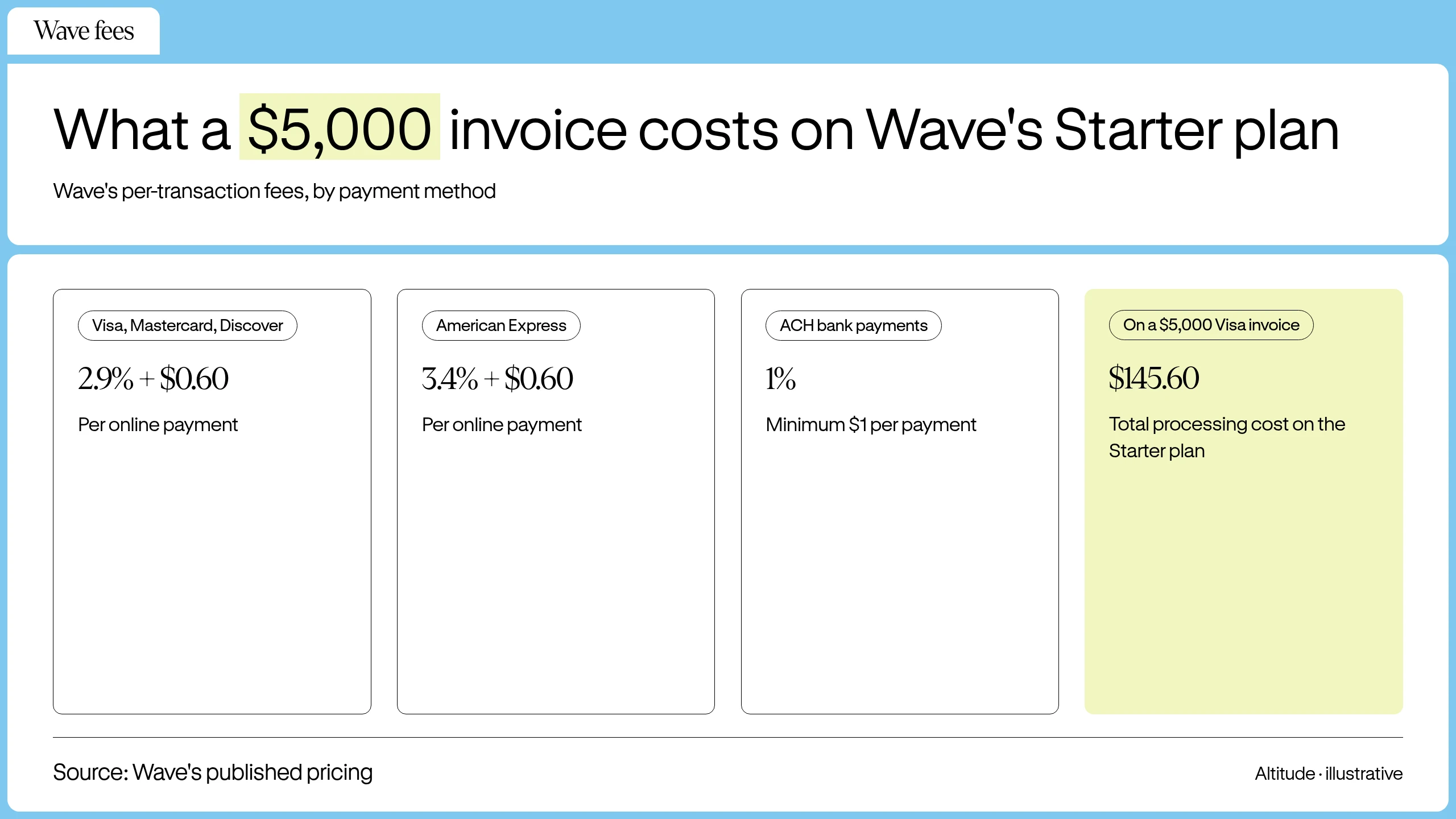
The Starter plan is free for invoicing and accounting. The catch is payment processing: Wave charges 2.9% + $0.60 per transaction for Visa and Mastercard online payments, and the same rate for Discover, which Wave's pricing footnote limits to the US. American Express costs 3.4% + $0.60, and ACH bank payments cost 1% (minimum $1).
At those Starter plan rates, a $5,000 invoice paid by Visa costs you $145.60 in processing fees on the Starter plan. The Pro plan costs $19/month and waives the flat per-transaction fee on the first 10 card transactions each month, so the same invoice costs $145.00 within that allowance, but the percentage-based fee remains the dominant cost for businesses with meaningful invoice volume.
Wave's Pro plan also adds auto-merged bank transactions, unlimited receipt capture, and automated late-payment reminders, which the free Starter plan doesn't include.
Wave works best for freelancers, sole proprietors, and very small businesses that operate entirely within the US or Canada and can receive payouts in a US or Canadian account.
Wave supports only businesses based in the US and Canada. If your business is incorporated in the UK, Europe, Latin America, or anywhere outside North America, you cannot use Wave for invoicing or payment collection. Within North America, Wave lets you invoice in a foreign currency, and its books track realized and unrealized FX gains and losses. Payouts still settle only to your US or Canadian business account. On foreign-currency card payments, the customer's bank or card issuer handles the conversion, so the rate is outside your control.
Zoho Invoice: free invoicing with single-currency limits
Zoho Invoice stands out for being free while still covering the basics of invoicing for small teams. It is part of the broader Zoho suite, which means it integrates with Zoho Books, Zoho CRM, and other Zoho products if you already use them.
Zoho Invoice features for founders
Zoho Invoice is free and includes up to 500 invoices per year, 2 users per organization, and 3 projects for time tracking, as listed on Zoho's pricing page. You can create professional invoices, set payment terms, track expenses, and accept online payments through third-party gateways like Stripe, PayPal, and Razorpay.
Zoho Invoice also supports recurring invoices and automated payment reminders. For businesses that bill retainer clients on a monthly cycle, this is a genuine advantage.
Zoho Invoice pricing and limitations
Zoho Invoice is free to use, with limits that depend on your region. Payment processing fees depend on which gateway you connect. Stripe charges its own processing fees of 2.9% + $0.30 for US domestic cards, plus 1.5% for international cards and 1% if currency conversion is needed (US pricing). Stripe publishes separate UK and EU rates in local currency, so check Stripe's pricing page for your country. These are charged by the gateway, not by Zoho Invoice, and for cross-border billing the international card and conversion charges can apply on top of the base rate.
Zoho Invoice works well for small teams that bill fewer than 500 invoices per year, operate within a single currency, and want a free tool that connects to a broader business software suite. It is also a good fit for freelancers and agencies that need time tracking bundled with invoicing.
The most significant limitation for cross-border businesses is that Zoho Invoice restricts invoicing to your base currency. If your organization is set up in USD, you invoice in USD. You can't send an invoice in EUR to a German client and have it settle in EUR without workarounds. Payment gateway availability also varies by country, which means the payment methods available to your clients depend on where your business is registered, and not where your clients are located.
FreshBooks: project-based billing with time tracking
FreshBooks has built its reputation on serving freelancers, agencies, and service businesses that need more than basic invoicing. Its strength is the combination of time tracking, project management, and client billing in one tool, which makes it a natural fit for businesses that bill by the hour or by the project.
FreshBooks invoicing capabilities
FreshBooks lets you create professional invoices with customizable templates, set recurring billing schedules, accept online payments, and track time against specific projects and clients. The platform also includes expense tracking, project profitability reporting, and a client portal where your customers can view invoices, make payments, and communicate with your team. The time tracking feature tracks billable hours by project and client, then converts those hours directly into invoice line items.
FreshBooks pricing and limitations
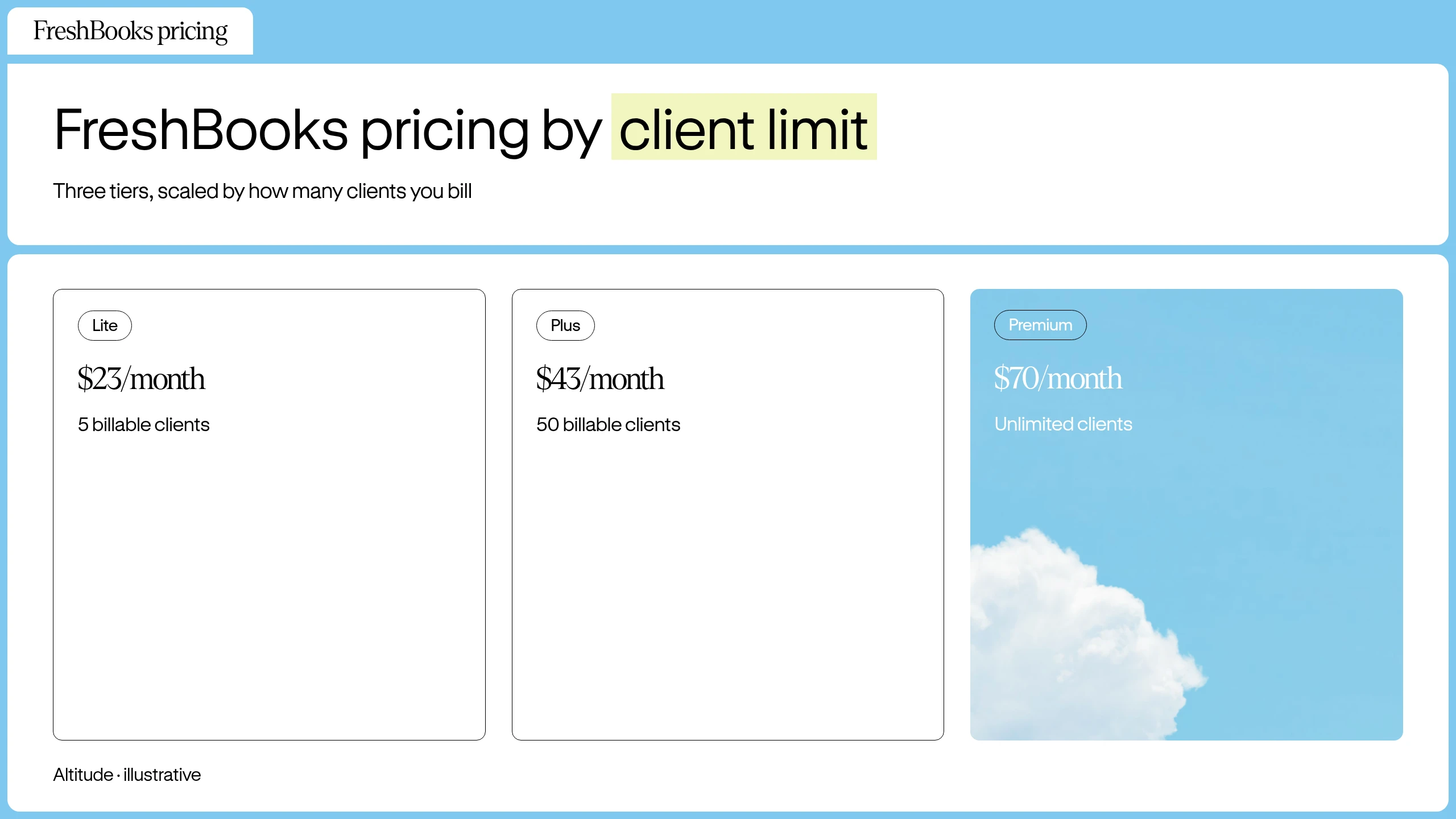
As of October 2026, FreshBooks list prices start at $23/month for the Lite plan, which limits you to 5 billable clients. The Plus plan lists at $43/month for 50 clients, and the Premium plan lists at $70/month for unlimited clients. FreshBooks also offers a custom-priced Select plan, which requires a quote from FreshBooks, as the price is based on custom preferences. An introductory discount is currently advertised on the standard plans, so the price shown at signup may differ from these list prices. Payment processing costs approximately 2.9% + $0.30 per credit card transaction, and FreshBooks Payments charges 1% for ACH bank payments. The Advanced Payments add-on costs $20/month.
The client limits on lower plans are the main constraint to plan around. A growing agency that starts on the Lite plan at 5 clients will hit that ceiling quickly, and the jump to Plus at $43/month nearly doubles the cost.
FreshBooks fits service businesses, agencies, consultants, and freelancers that bill by the hour or by the project and need time tracking integrated with invoicing. It is also a good fit for businesses that want a client portal for communication and payment.
FreshBooks supports multi-currency invoicing, and FreshBooks Payments, powered by Stripe, allows partial payments. FreshBooks Payments is available only to US and Canadian businesses, so businesses elsewhere connect Stripe directly. Stripe's own coverage claim is payments from clients in 190+ countries and 135+ currencies, and SEPA direct debit on EUR invoices comes through that direct Stripe connection, not through FreshBooks Payments. The currencies and payment methods those businesses can accept depend on their own Stripe account.
Payments process through FreshBooks Payments (powered by Stripe) or Stripe directly, and the two price foreign currency differently. FreshBooks lists a Foreign Exchange Fee of +2% on FreshBooks Payments, applied when the invoice's currency differs from your FreshBooks Payments account currency (USD or CAD). Stripe's published US pricing, which applies to a direct Stripe connection, lists a 1% currency-conversion fee and a 1.5% fee for international cards, charged on top of the base card rate. Stripe publishes separate UK and EU rates in local currency, so a UK or EU business should check Stripe's pricing page for its own country before it compares. For a business with significant international revenue, these costs compound on every invoice.
Mercury: invoicing bundled with a US business account
Mercury offers invoicing as part of its broader US business account. For US-incorporated startups, the combination of banking, invoicing, and payment processing in one platform is convenient.
Core Mercury invoicing workflows
Mercury lets you create and send invoices directly from your Mercury account. Clients can pay by ACH transfer, wire, or card. The payment lands in your Mercury account, and the transaction appears in your Mercury dashboard alongside your other financial activity. This eliminates the need for a separate invoicing tool if you already bank with Mercury.
Mercury pricing, use cases, and limitations
No monthly fee applies to the standard account. Domestic wires and USD international wires are free. Non-USD international wires carry a 1% currency exchange fee.
Some invoicing features need a paid plan. Recurring invoices and invoicing with ACH debit, charging $1 per transaction, require the Mercury Plus plan, which costs $29.90/month. The standard account covers one-off invoices.
To work with Mercury, your business needs to be formed and registered in the United States or a US territory. Mercury needs a real US operating address, not a registered-agent, P.O. box or UPS mailbox address. For foreign-incorporated businesses without a US entity, Mercury isn't an option. And while Mercury has added features for crypto businesses, its eligibility guidance states that accounts hold fiat, not crypto, which limits its usefulness for businesses that receive revenue in stablecoins.
Mercury works best for US-incorporated startups that invoice and settle in USD only, with invoicing and banking consolidated in one platform.
Altitude: invoicing and payment settlement in one account
Altitude's invoicing feature lets eligible businesses create and send invoices in USD or EUR directly from their Altitude account, as described in the create an invoice help article. The invoice and the payment settlement happen in the same account, which removes the need for a separate payment processor or FX provider.
Managing invoices with Altitude
You create an invoice by selecting a contact, setting the amount, choosing USD or EUR, and picking payment terms. The available terms are On receipt, Net 15, Net 21 (the default), Net 30, or a custom date. Net 21 is less common than the conventional Net 30, so flag the due date on your first invoice if a client expects a standard term. When you send the invoice, Altitude delivers it to the contact by email, so the client receives it directly in their inbox. Once sent, the invoice moves through four states: Draft, Open, Paid, and Void. You can track and manage these from the invoice dashboard, with details in the invoice statuses documentation.
When a client pays, the payment arrives in your Altitude account through the same rails you use for all other payments. For USD invoices, clients can pay by ACH, US domestic wire, or stablecoin transfer. For EUR invoices, clients can pay by SEPA transfer or stablecoin transfer. Stablecoin transfers accept USDC and EURC only, and a token sent in any other asset can be lost permanently. The receive invoice payments guide covers the settlement options available to your clients. You confirm deposit matching manually today, which means you match the incoming payment to the open invoice yourself. Matching any deposit marks the whole invoice paid, so for installments, match only the final payment. Automatic matching appears in the roadmap as coming soon.
For accounting, Altitude syncs transactions to QuickBooks Online and Xero in a one-way feed. Every posting requires your confirmation before it applies, and the sync covers bank deposits, payments, stablecoin transfers, and card activity, as described in the accounting help article.
Best teams for Altitude invoicing
Altitude fits businesses that bill clients in USD or EUR and need the payment to settle in the same account where they manage the rest of their finances. Eligible businesses open accounts from 200+ countries with no US entity required, with product availability varying by country.
The strongest fit is a cross-border agency, SaaS company, or service firm that bills international clients, pays contractors in multiple countries, and consolidates invoicing, payments, cards, and accounting in one account. US-only businesses that never touch international payments will find Mercury or Wave simpler for domestic-only workflows, and Altitude picks up where those tools stop once a client or contractor crosses a border.
Teams that get paid in stablecoins are also a fit. Clients can pay USD or EUR invoices by stablecoin transfer, which carries no Altitude fee when you receive it and typically settles in seconds on Solana. Only USDC and EURC are supported. USDC works on Solana, Ethereum, Base, Arbitrum, Optimism, Avalanche C-Chain and Tempo, while EURC works on Solana only, so a client who sends any other token, or sends on an unsupported network, can lose it permanently. The payment lands in the same Altitude account as your other receipts, and you still confirm the deposit match manually. Stablecoin transfers are irreversible once settled, so ask a new client to test with a small payment first.
Altitude fees for receiving and paying out
Altitude charges no platform fee for invoicing: creating, sending, and tracking invoices costs nothing beyond your Altitude account. Receiving invoice payments carries no Altitude fee, and bank deposits have no limits. The table below lists fees for paying out, because every outgoing payment carries its own per-transfer cost and minimum, and the exact fee is shown before you approve any outgoing payment:
| Rail | Altitude fee | Minimum | Timing |
|---|---|---|---|
| ACH | $0 | $5 | Same day to two banking days |
| Same-day ACH | $0 | $5 | Same business day |
| US domestic wire | $0 | $5 | Usually same day |
| SEPA (EURC-funded) | $0 | €5 | Standard SEPA transfers settle by the next business day, SEPA Instant settles in seconds |
| SEPA payout (USD-funded) | FX rate 0.4% above mid-market | Shown before you approve | Same SEPA timing as above |
| Faster Payments (UK) | FX rate 0.4%–0.6% above mid-market | Shown before you approve | Check the Altitude help center for the current timing |
| SPEI (Mexico) | FX rate 0.4%–0.6% above mid-market | Shown before you approve | Check the Altitude help center for the current timing |
| Pix (Brazil) | FX rate 0.4%–0.6% above mid-market | Shown before you approve | Check the Altitude help center for the current timing |
| Bre-B (Colombia) | FX rate 0.4%–0.6% above mid-market | Shown before you approve | Check the Altitude help center for the current timing |
| Outbound SWIFT | $35 | $100 per transfer | Varies by route and correspondent banks |
| Stablecoin transfers (USDC on Solana, Ethereum, Base, Arbitrum, Optimism, Avalanche C-Chain and Tempo; EURC on Solana) | $0 | 1 USDC or 1 EURC | Typically seconds on Solana |
UK, EU and Latin America payments use different routes and fee structures than the US examples above. EURC-funded SEPA carries no Altitude fee. SEPA payouts funded from USD are priced at 0.4% above mid-market, so a €10,000 payout carries an FX margin of about €40. Faster Payments payouts to the UK are priced at 0.4%–0.6% above mid-market per Altitude's help center, so a £5,000 payout carries an FX margin of about £20 to £30. In Latin America, SPEI (Mexico), Pix (Brazil) and Bre-B (Colombia) payouts use the same 0.4%–0.6% above mid-market pricing, which is about $20 to $30 of FX margin on a $5,000 payout.
These local payouts need workspace enablement and route approval, and they don't create a local-currency balance. For Asia, Altitude's documented fee set lists no local payout rail, so payments there go out by outbound SWIFT, which costs $35 with a $100 minimum per transfer, and sending, intermediary and recipient banks may still charge. Card processor rates for UK and EU cards differ from the US Stripe and Wave rates quoted in this article, so check the processor's pricing page for your country before you compare.
Other invoicing tools small businesses consider
Five more tools appear in most invoicing roundups. This section covers them briefly, without prices or fee rates, so check each vendor's pricing page for current terms.
QuickBooks Online and Xero
QuickBooks Online and Xero are accounting platforms that include invoicing, so they suit businesses that want invoicing and bookkeeping in one subscription. Both are paid monthly plans, which makes them a larger commitment than the free tools above. QuickBooks Online and Xero also offer multi-currency features and payment options that vary by plan and country, so confirm what your plan includes.
Square Invoices
Square Invoices fits businesses that already take card payments through Square, because the invoice and the payment run through the same Square account. Square is available only in the countries where it operates, and card processing fees apply to invoice payments, so check eligibility and current rates before you switch.
PayPal
PayPal lets you send an invoice that clients pay with a PayPal balance or a card. It works for clients who already use PayPal, though the processing fees and any currency conversion charges depend on your country and the payment method, so review them before you invoice cross-border clients.
Invoice Ninja
Invoice Ninja is an open-source invoicing tool with a hosted version and a self-hosted option. It suits teams with some technical capacity who want control over their setup. Payment gateways connect separately, so processing fees depend on the gateway you choose.
Mobile apps, reminders, and late fees
Reminder and late-fee automation varies by plan, so check which plan includes it before you rely on it. Wave requires the Pro plan for automated late-payment reminders, Zoho Invoice includes automated payment reminders, and Mercury's recurring invoices need Mercury Plus. For FreshBooks and for mobile apps on any tool, check the vendor's plan page, because app availability and features can differ by plan and platform. Confirm whether a late fee is applied automatically or has to be added to each invoice by hand.
Tax, VAT, and e-invoicing
This comparison doesn't test tax calculation, VAT handling, or e-invoicing. Sales tax, VAT, and electronic invoicing requirements differ by country and sometimes by customer type, and some countries require invoices in a prescribed electronic format. Confirm the rules that apply to you with your accountant or tax authority, then check that your chosen tool can add tax lines and produce the format you need.
Outside the US, the rules are more prescriptive. In the UK, VAT-registered businesses must put prescribed details on each VAT invoice, and Making Tax Digital for VAT requires digital VAT records and returns filed through compatible software. In the EU, e-invoicing mandates are phasing in country by country, with Germany's requirements starting in 2025 and France's in 2026. Each country sets its own format, timing, and business-size rules for sending and receiving e-invoices, and a PDF invoice may not meet them. Before you pick a tool, check whether it, or the accounting software it syncs with, supports the format and filing method your country requires. Confirm current dates and scope on your tax authority's pages, because phase-in dates differ by country and business size.
Matching invoicing features to your business needs
The right invoicing software depends on three questions: where your business is incorporated, what currencies you bill in, and how your clients pay you. The answers determine which tool fits your operating pattern.
Managing multi-currency invoicing
If you bill clients in more than one currency, your invoicing software needs to settle the payment in that currency and give you control over the FX conversion, not just display a foreign currency on the invoice.
The Wave, Zoho Invoice, FreshBooks, and Mercury sections above cover each tool's currency limits in detail. In short, Zoho Invoice bills in one base currency, Wave and FreshBooks accept foreign-currency invoices but limit payouts and payment tools by region, and Mercury settles in USD.
For any of those four tools, crossing a currency boundary creates either an FX conversion cost outside your control or a workflow that doesn't close cleanly. Altitude invoices in USD or EUR and settles each invoice in the currency it was billed in, through ACH, US domestic wire, SEPA, or stablecoin transfers into the same account, with no Altitude fee for receiving payments.
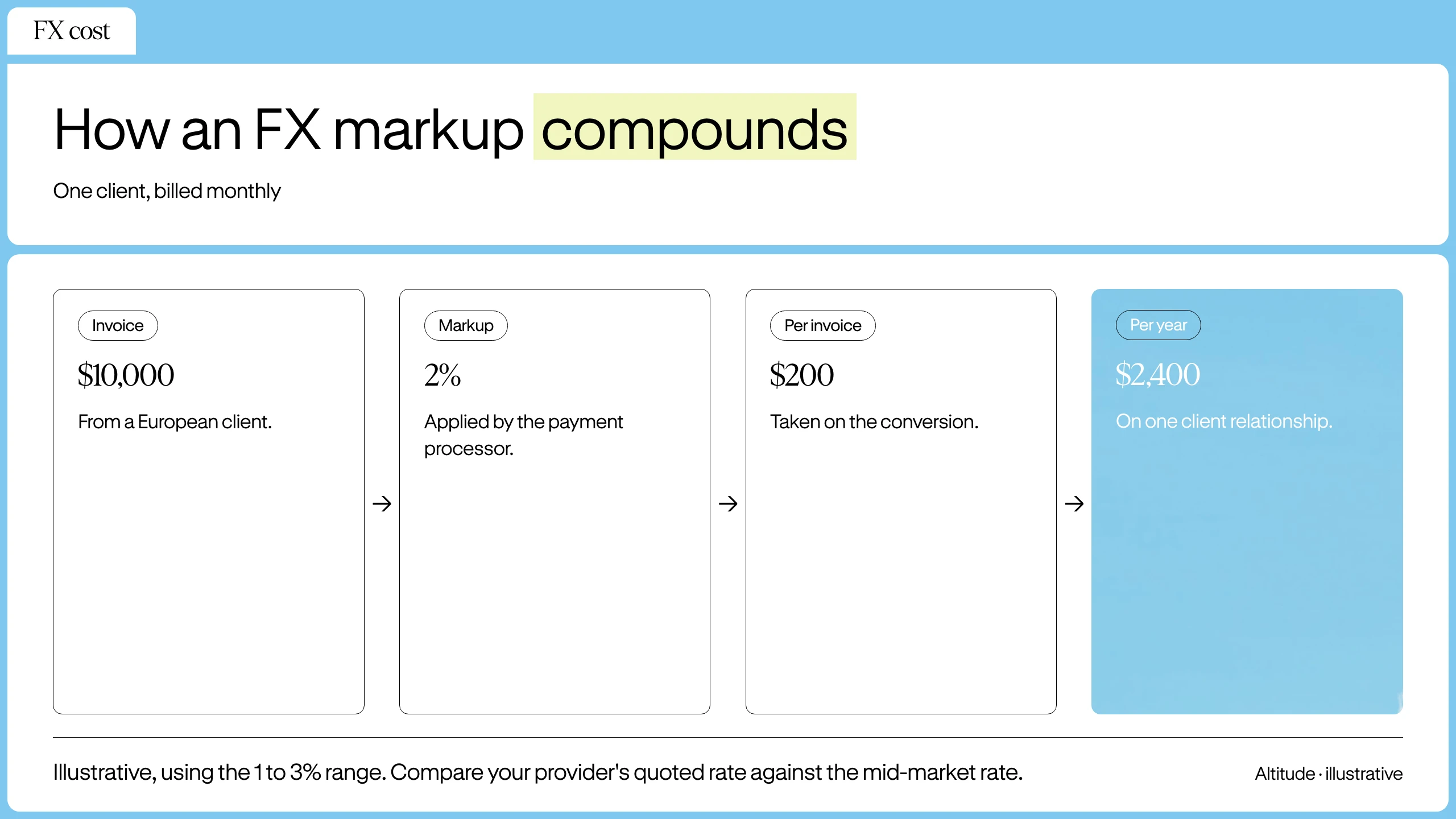
For cross-border billing, the total cost includes not just the invoicing software subscription but the FX conversion on every payment. A $10,000 invoice from a European client, converted at a 2% FX markup through a payment processor, costs you $200 per invoice. Over a year of monthly billing, that is $2,400 in hidden costs on a single client relationship.
Choosing by company structure and geography
If your business is incorporated in the US, your clients are domestic, and you bill in USD, you have the most options. Wave is free and handles the basics well. FreshBooks adds time tracking and project billing for service businesses. Mercury bundles invoicing with your business account if you already use it for banking. Zoho Invoice is free and includes recurring invoices and reminders. The decision comes down to whether you need time tracking (FreshBooks), a broader business suite (Zoho), integrated banking (Mercury), or the simplest free option (Wave).
For startups that operate across borders from day one, the calculation changes. Altitude charges no platform fee for invoicing, though it isn't a standalone invoicing tool. It is a global business account that includes invoicing as part of the broader platform. For a startup that needs invoicing plus cross-border payments, multi-currency accounts, and accounting sync, having everything in one account can outweigh the appeal of a free standalone invoicing tool, if the reconciliation work that tool creates downstream costs you more.
See how Altitude handles invoicing and cross-border settlement in one account. Book a demo.
FAQs
What is the best invoicing software for small businesses?
The best invoicing software depends on how your business gets paid. Wave is free for US and Canada businesses with simple billing. FreshBooks starts at $23/month and adds time tracking for project-based firms. Mercury bundles invoicing with a US business account. Cross-border teams billing in USD or EUR can also consider Altitude, which settles invoices in the currency billed.
Can I send invoices in multiple currencies?
Yes, with limits that vary by tool. Zoho Invoice bills only in your base currency, FreshBooks and Wave both support foreign-currency invoices with regional limits on payments and payouts, and Mercury settles in USD. Altitude supports invoicing in USD and EUR, with clients paying by ACH, US domestic wire, SEPA, or stablecoin transfer.
Does invoicing software sync with accounting tools?
Wave includes basic built-in accounting. Zoho Invoice integrates with Zoho Books. FreshBooks includes its own accounting features. Mercury connects to QuickBooks Online and Xero through direct integrations. Altitude syncs transactions to QuickBooks Online and Xero.
What's the difference between free and paid invoicing software?
Free invoicing tools like Wave and Zoho Invoice cover basic invoice creation and sending, but card payments carry fees at the processor's rate, for example, 2.9% + $0.60 on Wave Starter, or the connected gateway's own rate on Zoho Invoice, which charges no processing fee itself. Free tools may also limit clients, currencies, or features. Paid tools like FreshBooks add time tracking, project billing, and higher client limits. Altitude charges no platform fee but is a full business account.
Do I need a US entity to use invoicing software?
Wave requires a US or Canada business. Mercury requires US or US-territory incorporation with existing or planned US operations. Zoho Invoice runs regional editions with different payment gateways, so check with Zoho which gateways your country's edition supports. FreshBooks software is sold internationally, but FreshBooks Payments is available only to US and Canadian businesses. Altitude opens accounts for eligible businesses from 200+ countries with no US entity required, with product availability varying by country.
Does invoicing software handle VAT and e-invoicing?
Many invoicing tools can add tax lines to an invoice, but support for VAT rules and mandatory e-invoicing formats differs by tool, plan, and country. UK businesses face VAT invoice requirements and Making Tax Digital, and EU countries such as Germany and France are phasing in e-invoicing mandates. This comparison doesn't test tax calculation. Check your tax authority's requirements and the vendor's documentation before you rely on any tool for compliant invoices, and ask your accountant to confirm.
Key terms glossary
Payment rail: The network a payment travels on to reach the recipient. Common rails include ACH (US bank transfers), SEPA (euro bank transfers), Faster Payments (UK), Pix (Brazil), SPEI (Mexico), Bre-B (Colombia), SWIFT (international bank transfers), and stablecoin transfers. Each rail has its own settlement time, fee structure, and geographic coverage.
FX markup: The percentage added to the mid-market exchange rate when converting one currency to another. To find your markup, compare the rate your provider quotes with the mid-market rate on the day of the payment. The markup compounds on every recurring international invoice.
Settlement window: The time between when a payment is initiated and when the funds are available to the recipient. ACH settles same day to two banking days, depending on the option used. Standard SEPA transfers settle by the next business day, and SEPA Instant settles in seconds. Stablecoin transfers on networks such as Solana typically settle in seconds.
Invoice reconciliation: The process of matching an incoming payment to the corresponding invoice and recording it correctly in your accounting ledger. Manual reconciliation requires comparing bank statements to open invoices. Automated matching connects deposits to invoices by amount and reference.
Deposit matching: The step where you confirm that an incoming payment corresponds to a specific open invoice, which marks the invoice as paid. Some platforms match deposits automatically, while others require you to confirm each match manually.
One-way sync: An accounting integration where data flows in one direction only, from the payment platform to the accounting ledger. Changes made in the ledger don't flow back to the payment platform, and some platforms require you to confirm each posting before it applies.
Altitude is a financial technology platform, not a bank or digital asset custodian.