





 Startups
  Creative agencies
  Onchain teams
  European businesses
  AI
AI  Software
TL;DR: An invoice is a payment request you send to a customer. A bill is a payment request you receive from a vendor. A receipt is proof that payment happened. The distinction matters because each document triggers a different workflow: invoices go into accounts receivable, bills go into accounts payable, and receipts close the loop. For a founder managing cross-border payments without a finance team, routing a document into the wrong workflow creates duplicate payments, reconciliation delays, and audit risk.
People often use “invoice” and “bill” to mean the same thing. In everyday conversation, that usually isn’t a problem. But when you’re managing your business finances, they’re handled differently. For a founder running a business across several countries without a dedicated finance team, keeping these records organised can make month-end bookkeeping much easier. This guide explains how invoices, bills, and receipts differ and how to handle each one.
When to use an invoice vs a bill
| Document | Direction | When It Appears | What It Triggers |
|---|---|---|---|
| Invoice | You send it to a customer | Before payment | Accounts receivable, payment collection workflow |
| Bill | Vendor sends it to you | Before payment | Accounts payable, approval workflow, payment execution |
| Receipt | You send after receiving payment, or vendor sends after you pay | After payment | Proof of payment, reconciliation, expense tracking |
Invoice vs bill: key distinction
An invoice is a payment request you send after delivering a product or service, and a bill is a payment request you receive from a supplier or contractor. The difference is directional and operational. Invoices live in your accounts receivable (AR), bills live in your accounts payable (AP), and the two sides reconcile differently in your books. AR tracks the money customers owe you, and AP tracks the money your business owes to vendors.
What matters is the workflow the document triggers. When you send an invoice, you're initiating a collection process. When you receive a bill, you're entering an approval and payment process.
When to send an invoice vs a bill
You send an invoice when you've completed work and are requesting payment. A bill arrives when a vendor has delivered goods or services to you.
For a founder managing contractors in Mexico and clients in Germany, the distinction shows up in practice. You send an invoice to your German client for the software feature you shipped. Your Mexican contractor sends you a bill for the development work they completed. One document goes out, one comes in, and both need to match a payment in your account before the month closes clean.
Core components of a professional invoice
An invoice is only useful if it contains the information needed to process payment and reconcile the transaction. A professional invoice includes the fields that serve this purpose: invoice number, issue date, due date, business and customer details, description of goods or services, quantity and unit price, and total amount due.
Essential elements of a valid Invoice
A valid invoice needs enough detail for the recipient to approve payment and for both parties to match the transaction in their books. US and EU requirements differ: the US sets no prescribed invoice format, while EU VAT rules list the fields an invoice must contain. If you invoice clients in both regions, check each set below.
US invoice requirements
For US-based businesses, the IRS doesn't prescribe an invoice format, but per IRS Publication 583, supporting records should "identify the payee, the amount paid, proof of payment, the date incurred," so invoices should contain enough detail to substantiate the transaction. This guidance is specific to US federal recordkeeping, and businesses in other countries follow their own national invoice and record rules.
For a US invoice, recommended contents include:
- A unique invoice number that both parties use to track the document
- The issue date and a due date based on your payment terms
- Your legal business name, address, and contact details
- The client's name and contact information
- A clear, itemized description of the goods or services delivered
- Quantities and unit prices that show how the total was calculated
- The total amount due, including any applicable taxes or fees
EU invoice requirements
Unlike the US, the EU sets mandatory invoice content. The EU VAT Directive (Article 226) lists the details a VAT invoice must include, and individual member states may add their own requirements. Core fields include:
- The date of issue and a sequential invoice number
- The supplier’s VAT identification number, and the customer’s VAT number where the customer is liable for the VAT (for example, under the reverse charge)
- The full names and addresses of the supplier and the customer
- The quantity and nature of the goods, or the extent and nature of the services
- The date of supply, if different from the issue date
- The taxable amount per VAT rate, the unit price excluding VAT, and any discounts
- The VAT rate and the VAT amount payable, or a reference to the exemption that applies
- The mention “Reverse charge” where the customer accounts for the VAT
For cross-border invoices, currency, tax treatment, and business identification details deserve particular attention. Clearly state the invoice currency, include the applicable tax identification details, and explain why VAT or other sales tax isn’t charged when the relevant rules require an explanation. Requirements vary by jurisdiction and transaction type. The European Commission’s VAT invoicing guidance provides an example of how these rules work in the EU.
Triggers for sending invoices
You send an invoice when you deliver a product or service and are requesting payment. The timing depends on your agreement with the client. Common triggers include:
- On delivery: Send the invoice as soon as the work is complete or the product ships.
- On milestone completion: For project work, invoice when a defined milestone is reached.
- On a recurring schedule: For retainers or subscriptions, invoice monthly, quarterly, or annually.
- On receipt of a purchase order: In B2B transactions, the client sends a PO, you deliver, then you invoice against the PO.
Altitude, the global business account for companies that pay and get paid across borders, includes invoicing with payment terms of On receipt, Net 15, Net 21, Net 30, or a chosen date, with Net 21 as the default (as of September 2026). You can invoice in USD or EUR, with invoice states tracked as Draft, Open, Paid, or Void.
Sample invoice (illustrative)
A complete cross-border invoice includes:
| Field | Sample value |
|---|---|
| Invoice number | INV-2026-042 |
| Issue date | October 1, 2026 |
| Due date | October 22, 2026 (Net 21) |
| From | Acme Software Ltd, 123 Main St, London, UK, VAT No: GB123456789 |
| To | Client Corp, 456 Oak Ave, Berlin, Germany, VAT No: DE987654321 |
| Description | Custom API integration, Phase 2 |
| Quantity | 40 hours |
| Unit price | $150/hour |
| Subtotal | $6,000 USD |
| Tax | Reverse charge: customer accounts for VAT in their jurisdiction |
| Total | $6,000 USD |
| Payment terms | Net 21 |
| Payment instructions | Wire to IBAN GB29 NWBK 6016 1331 9268 19, BIC NWBKGB2L |
This invoice gives the client everything they need to approve the payment, match it to their accounts payable, and execute the wire. The invoice number and due date make it trackable in both systems. The IBAN (International Bank Account Number) identifies the receiving account, and the BIC (Bank Identifier Code) identifies the receiving bank.
To build an invoice with these fields, you can use Altitude's Cryptoinvoice.new invoice generator. Check the finished invoice against the US or EU requirements above before you send it, because the tool can't confirm which tax details your jurisdiction requires.
How to identify a bill versus an invoice
When a document lands in your inbox, the first question is which direction the money is moving. If someone is asking you to pay, it is a bill. If you are asking someone else to pay, it is an invoice.
The same document, two perspectives
The same document can be an invoice to the sender and a bill to the recipient. An invoice is a seller's formal request for payment, while a bill is what the customer owes. The term depends on your position in the transaction. Your contractor calls it an invoice when they send it, and you call it a bill when you receive it. The document itself never changes type, but the workflow each side runs on it does.
Distinguishing bills from invoices
When you are looking at a payment request in your inbox, use this quick check to categorize it:
Quick check: is it a bill or an invoice?
- Who sent it? If a vendor, supplier, or contractor sent it to you, it's a bill.
- Does it reference a purchase order (PO) you issued? If yes, it's a bill against that PO.
- Which direction is the payment moving? Money coming in means you sent an invoice. Money going out means you received a bill.
Bills go into your accounts payable queue for approval and payment. Invoices go into your accounts receivable queue for tracking and collection.
What a vendor bill contains
A bill from a vendor typically contains: vendor name and contact details, bill or invoice number (their tracking identifier), date issued, due date, line items with quantities and unit prices, total amount, and payment instructions. Vendors typically send bills as PDFs or email attachments. Your job is to get them into a payable workflow before the due date.
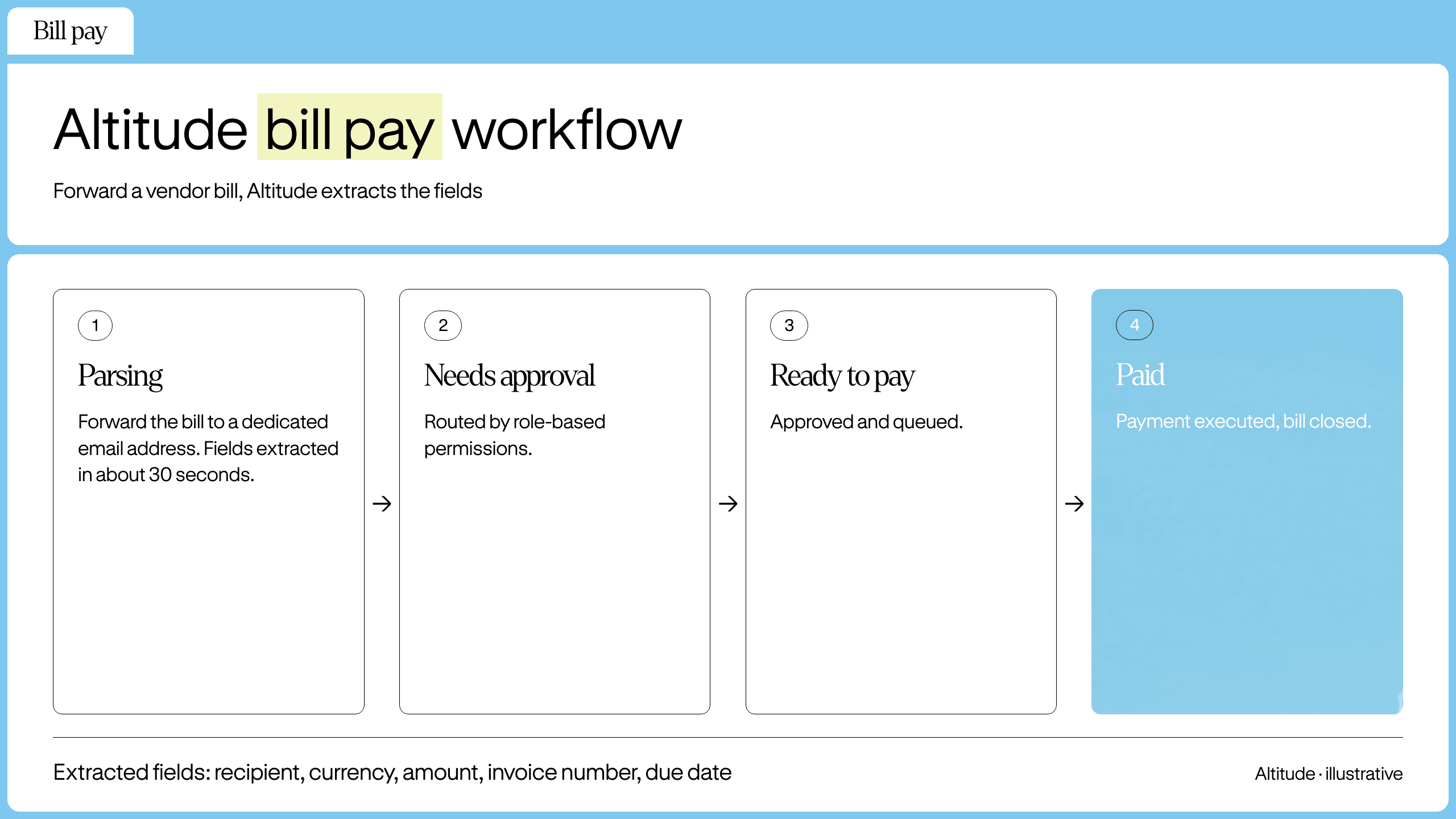
Altitude's bill pay feature lets you forward vendor invoices to a dedicated email address, and Altitude extracts the recipient, currency, amount, invoice number, and due date in about 30 seconds. The bill then moves through Parsing, Needs Approval, Ready to Pay, and Paid states.
Invoice vs receipt: another common confusion
A receipt is proof that payment happened, not a payment request.
Receipt issuance triggers
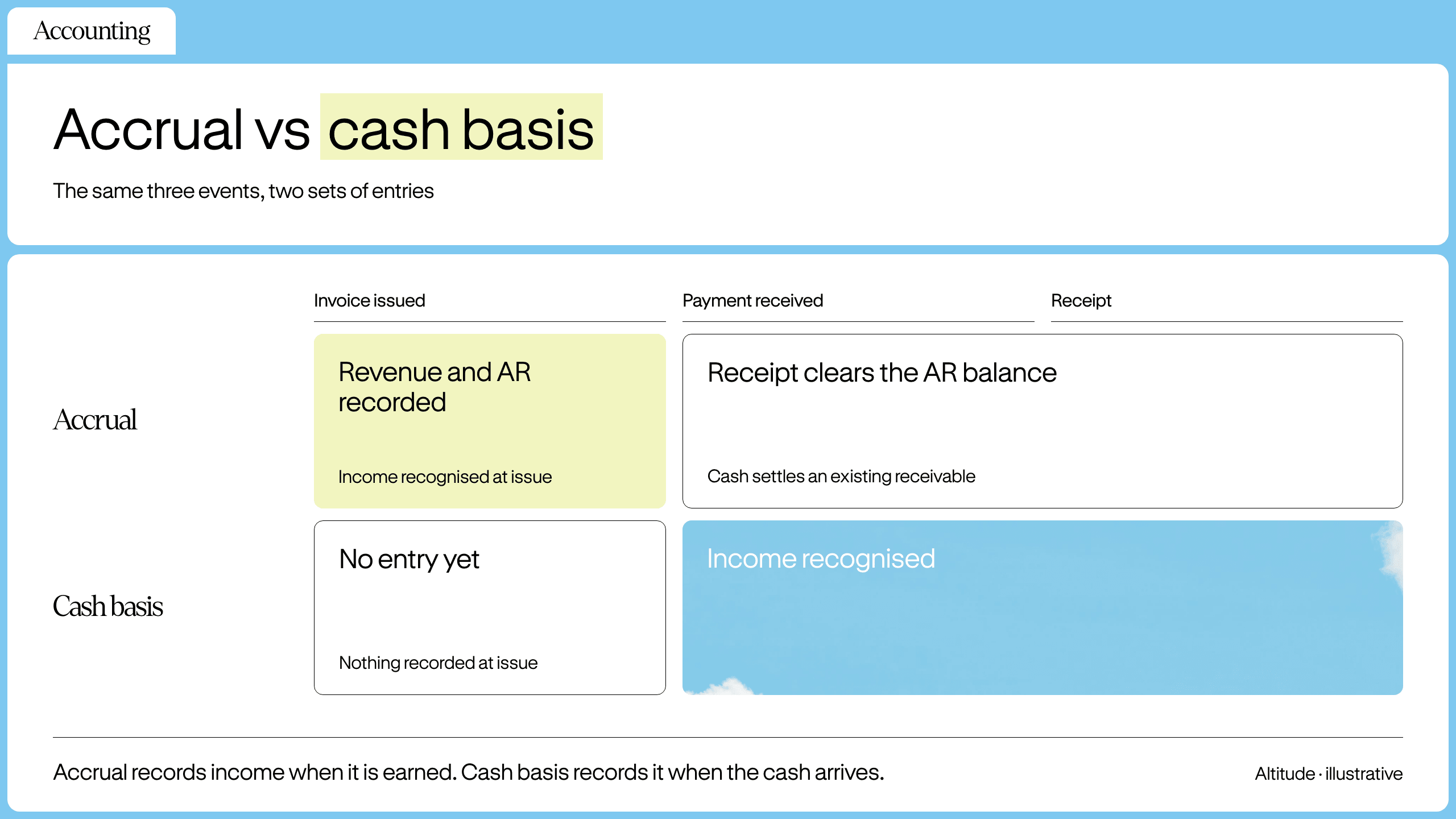
You issue a receipt after you receive payment, and you expect a receipt from a vendor after you pay them. Under accrual accounting (where you record income when it's earned, not when cash arrives), revenue and accounts receivable are recorded when you issue the invoice; the receipt clears the AR balance when payment settles. Under cash-basis accounting (where you record income only when cash actually lands), the receipt marks the moment income is recognized.
When you pay a contractor, you want a receipt that matches the outgoing wire or ACH transfer in your account. When a client pays you, you send a receipt that matches the incoming deposit. An invoice supports approvals, matching, and posting before payment, while a receipt supports proof of payment after settlement. Treating them as interchangeable breaks the audit trail.
Altitude's receipt-matching feature lets you forward receipts to a dedicated email address after each card transaction, and the platform matches them to transactions by amount, merchant, and date. Admins review unmatched or flagged items. This keeps expense documentation tied to actual card activity.
How to handle multi-country client payment flows
When your clients and vendors are in different countries, the invoice-to-payment-to-receipt loop crosses currencies, time zones, and payment rails. The operational work is matching each document to a payment in your account, then reconciling both sides in your books.
Reducing friction in multi-currency billing
Two operational practices reduce friction:
- Invoice in the currency you want to be paid in. If your costs are in USD and your client is in the UK, invoice in USD. State the currency code (USD, EUR, GBP) clearly on the invoice. This avoids ambiguity about which side bears the foreign exchange (FX) conversion.
- Note the FX rate if you invoice in one currency and receive in another. The EU VAT Directive requires invoices to include the supplier's (and in some cases the customer's) VAT identification number (Article 226); if you invoice in a currency other than your national currency, the VAT amount itself must still be convertible to national currency under the Directive's conversion rules (Article 230).
If you invoice in EUR but your account receives USD after conversion, note the exchange rate applied and the date. In Altitude, matching a deposit marks the whole invoice as paid, whatever the deposit amount, so a deposit that differs after FX conversion needs a manual note to explain the variance at month-end.
Setting payment deadlines across zones
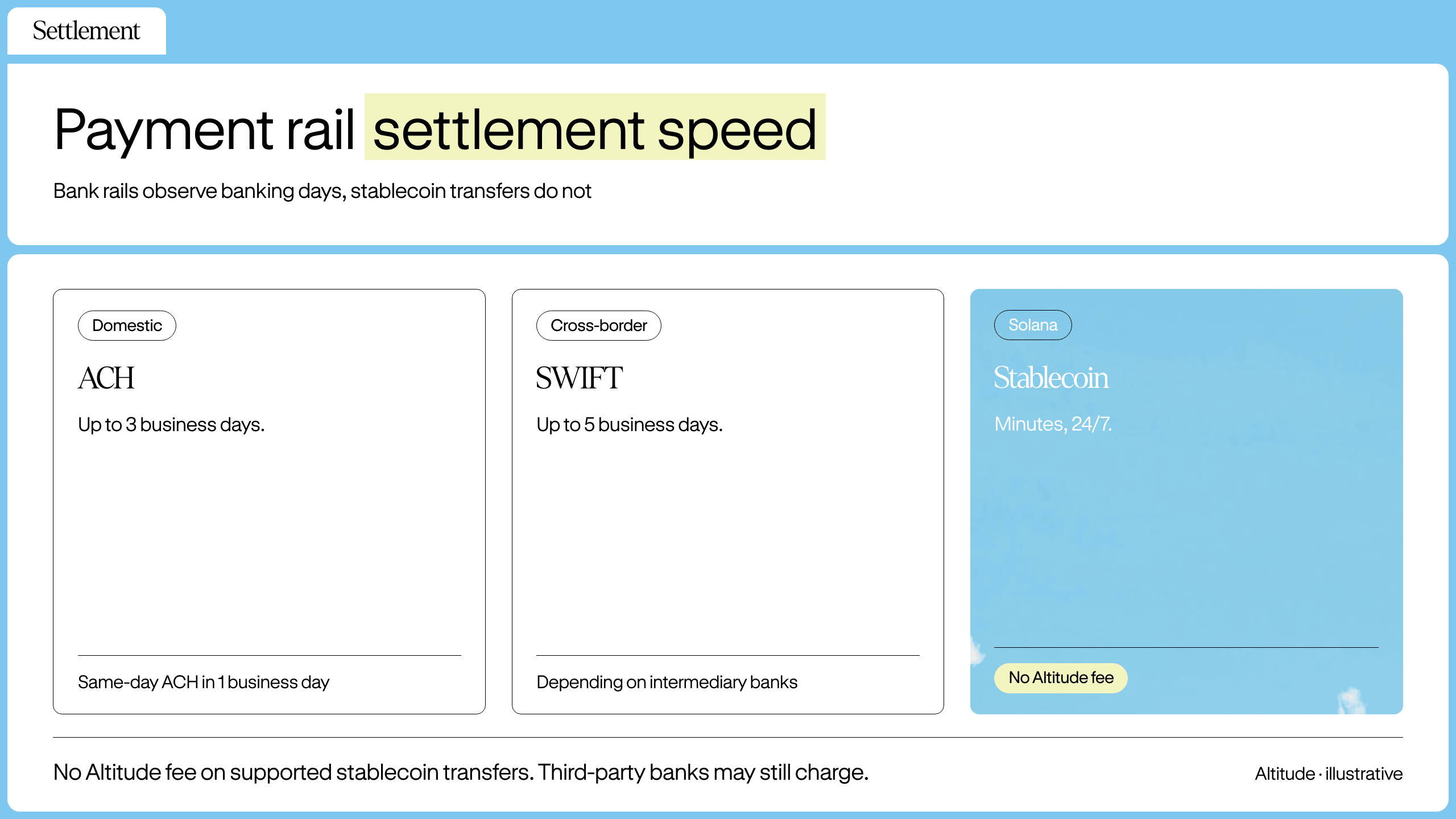
Payment terms are a promise about when money will arrive. Standard ACH payments settle in up to 3 business days (Same Day ACH in 1 business day), and cross-border SWIFT payments can take up to 5 business days depending on intermediary banks. When your client is in San Francisco and your contractor is in São Paulo, due dates need to account for these rails and banking-day windows so neither side is caught waiting.
Stablecoin transfers settle outside banking hours. Altitude supports stablecoin payments on Solana that settle in minutes, 24/7, with no Altitude fee for supported stablecoin transfers. This matters when a contractor invoice arrives Friday afternoon and you don't want to make them wait until Monday for a SEPA (Single Euro Payments Area) or ACH window.
Matching international invoices to bills
When these flows happen in multiple currencies across multiple platforms, reconciliation becomes manual work. Errors in accounts payable (AP) can lead to unrecorded liabilities or fraud exposure, while errors in accounts receivable (AR) can overstate revenue or mask collection problems.
Altitude handles both sides of this loop in one account. You can receive invoice payments, track invoice status from Draft to Open to Paid, and match deposits manually today. Automatic deposit matching is documented as coming soon. On the payable side, you forward a vendor bill to the bills email address, and Altitude extracts the key fields and moves the bill through approval states until it is marked Paid. Until automatic matching ships, confirm that each invoice you send in Altitude matches the deposit and the revenue entry in your books.
Duplicate invoices or system errors can result in paying the same bill twice, distorting your AP records and requiring manual recovery from vendors. Weak approval workflows make it easy for payments to slip through without the right sign-off. Altitude's approval rules are configured with role-based permissions and adjustable thresholds. A payment won't execute unless the configured approvers sign off, so you're not manually reviewing every transaction at month-end.
Getting the terminology right is the foundation. But for a founder running cross-border payments without a finance team, the bigger win is a workflow that routes documents consistently: invoices into AR, bills into AP, and receipts closing the loop, so the sorting happens at the point of entry.
See how Altitude manages invoices, bills, and receipts in one place across currencies and borders. Book a demo.
FAQs
Is an invoice the same as a bill?
No. An invoice is a payment request you send to a customer, while a bill is a payment request you receive from a vendor. The term depends on which side of the transaction you're on.
Do I need to send an invoice or a receipt?
Send an invoice before payment when you are requesting money from a customer. Send a receipt after payment as proof the transaction settled. An invoice initiates the payment workflow and a receipt closes it.
Can a bill become an invoice?
Yes, in the sense that the same document is an invoice to the sender and a bill to the recipient. A payment request your contractor sends is their invoice and your bill at the same time, because the term depends on which side of the transaction you occupy: invoices go out so you get paid, bills come in so you can pay others. The document itself doesn't change, but the label in your books depends on which side of the transaction you are on.
What happens if I use the wrong term?
The wrong term creates confusion about which workflow to run and which account to post to. The operational risk is duplicate payments, missed receivables, and reconciliation gaps at month-end.
What payment terms should I use on an invoice?
Common terms are On receipt, Net 15, Net 30, or a specific due date. Altitude's default is Net 21. Choose terms that match your cash flow needs and your client's payment cycle. Shorter terms improve cash flow but may strain client relationships. Longer terms are easier on clients but delay your receivables.
Key terms glossary
Invoice: A payment request you send to a customer after delivering a product or service. It includes the amount due, payment terms, and instructions for how to pay. Invoices are tracked in accounts receivable.
Bill: A payment request you receive from a vendor or supplier after they deliver goods or services to you. It includes the amount owed, due date, and payment instructions. Bills are tracked in accounts payable.
Receipt: Proof of payment issued after a transaction settles. A receipt confirms that money moved from one party to another and is used for expense tracking and audit trails.
Payment Terms: The agreed timeline for when payment is due after an invoice is issued. Common terms include On receipt (due immediately), Net 15 (due in 15 days), Net 30 (due in 30 days), or a specific calendar date.
Altitude is a financial technology platform, not a bank or digital asset custodian.