
TL;DR: You can manage multiple businesses from one login, but how depends on the setup: separate logins per entity, a multi-entity business account, or accountant access to each entity. Under any option, each legal entity keeps its own accounts, approval rules, and records. A workspace per entity keeps balances separate, approval workflows unshared, and audit trails per entity. Group consolidation happens in accounting software, with one accounting file per entity.
Take a group with three legal entities and a €14,000 invoice (an illustrative figure) from a Berlin supplier, due Friday from the German subsidiary. With a separate login per entity, the approver has to locate the subsidiary's credentials and sign in before approving. If the payment goes out as a standard SEPA Credit Transfer, which settles by the next business day, an approval delayed by that search on the due date means the supplier is paid late. The same setup also leaves three approval chains and three ledgers to reconcile at month-end.
Options for managing multiple legal entities
Three setups cover most multi-entity businesses, and each trades convenience against separation:
- Separate logins per entity: each entity banks with its own provider or holds its own credentials. The separation is clean, but approvers must sign in to each portal, credentials multiply, and every ledger is reconciled on its own.
- One login with a workspace per entity: a multi-entity business account lets one login switch between entities that each keep their own accounts, approval rules, and records. Providers implement this differently, and Altitude, a global business account, is one example of a business account built this way.
- Accountant or bookkeeper access: an outside accountant gets read-only access or exported files for each entity instead of operating the accounts.
Under any of these options, group consolidation happens in accounting software, where you combine the entities' books and eliminate intercompany balances.
In the scenario above, a multi-entity account lets the approver switch to the subsidiary's workspace and approve under that workspace's own rules. The login is shared, but the balances and records stay separate.
Operational risks of disconnected entity logins
Context-switching between portals during time-sensitive payments
Standard bank transfers depend on cut-off times set by the sending bank, and they don't wait for you to log out of one portal and into another. If you are holding credentials for the wrong entity when a payment is due, the approval slips past the cut-off and the supplier is paid late. Stablecoin transfers settle in seconds because the network doesn't observe banking cut-off times, so a payment due on a weekend can still go out, but only if you can access the correct workspace before the due date passes. Stablecoin transfers are irreversible once settled, so send a small test payment first when paying a new recipient.
The operational cost is mistakes. If you initiate a payment from the wrong entity with the wrong cost center, you create reconciliation work that multiplies at month-end. A single login with per-entity workspaces removes this context-switching, so you move between corporate entities without re-authenticating.
Reducing exposure from shared logins
When three people share one login to manage three entities, you can't prove who approved what, for which entity, at what time. Shared credentials make it hard to show auditors who approved what, and they create security exposure: one compromised password gives access to every entity.
The alternative is per-entity workspaces with role-based permissions. Approval activity stays scoped to the workspace it happened in, so auditors can review each entity on its own records rather than untangling a shared login.
Reconciliation risks in siloed ledgers
Month-end close when each entity lives in a separate system means manually threading transaction records across portals and spreadsheets. You match transaction IDs against bank statements and ERP entries by hand, then preserve artifacts for audit. Running stablecoin transfers and bank transfers in parallel adds more records to match and more places for a mismatch to go unnoticed.
How unified login simplifies entity switching
Unified login for managing multiple legal entities
In a multi-entity setup, you move between workspaces from one login. Each workspace is isolated, so switching doesn't blur entity lines or create a combined view. Some providers offer a combined view, so check whether yours does and whether you want one.
This is how you manage multiple businesses without managing multiple passwords. The login is unified, but the workspaces remain distinct legal and financial environments.
Maintaining distinct legal entity audit trails
Each workspace holds its own transaction history, approval records, and ledger exports, so audit review happens per entity rather than per login. Every payment execution is documented with its commercial rationale captured at the decision point, and approval workflows produce records that satisfy internal audit and external review.
Ad hoc payments that bypass the approval chain are a control failure. Keeping workspaces separate limits cross-entity contamination, so an incident in one entity is less likely to create audit gaps in another.
Keeping legal and financial entities distinct
Individual entity balance reconciliation
Balances don't combine across entities. Each workspace reconciles independently, with its own accounts in the currencies it uses (such as USD and EUR), its own transaction history, and its own export files, which preserves the legal and financial separation each entity requires.
Each entity's account has its own account details, such as an account and routing number for USD or an IBAN for SEPA payments in EUR, so funds land in the correct entity without manual routing.
Defining entity-level approval policies
In a workspace-per-entity setup, approval thresholds and role-based permissions are set per workspace rather than inherited from a parent account. This replaces routing every payment through a single founder or a shared credential.
Providers that support approval thresholds let you require sign-off from enough of your team before money moves, so no single login can move funds alone. Where a provider offers role-based permissions, you can add view-only members who can see the account without approving, which gives visibility without granting authority.
Standardizing ledger export formats
Most business accounts let you export transactions to CSV or PDF for each account. A CSV is the most portable option and imports into most accounting tools, including QuickBooks and Xero, even where a live sync isn't available.
Standardized formats reduce the manual work of threading data across systems at month-end. In a workspace-per-entity setup, you export per workspace, not per login, so each entity maintains its own audit-ready records.
Commingling and veil-piercing risk
Paying one entity's expenses from another entity's account blurs the line between them. When legal entities share funds without documentation, a court or tax authority may question whether they are truly separate, which is the concern behind veil-piercing arguments. Separate workspaces keep each entity's funds, cards, and approvals apart, and each audit trail shows which entity paid what. Document intercompany loans and reimbursements in writing, and ask counsel how your jurisdictions treat them.
Treasury operations across every workspace
Treasury operations across multiple legal entities come down to four tasks: tracking each entity's cash position, approving payments under that entity's rules, matching records at month-end, and moving money between entities. A multi-entity account handles each task per workspace.
Position reconciliation by legal entity
Position reconciliation runs per workspace: you match one entity's ledger against its own accounts and export files, and the single login lets you move between entity ledgers without re-authenticating.
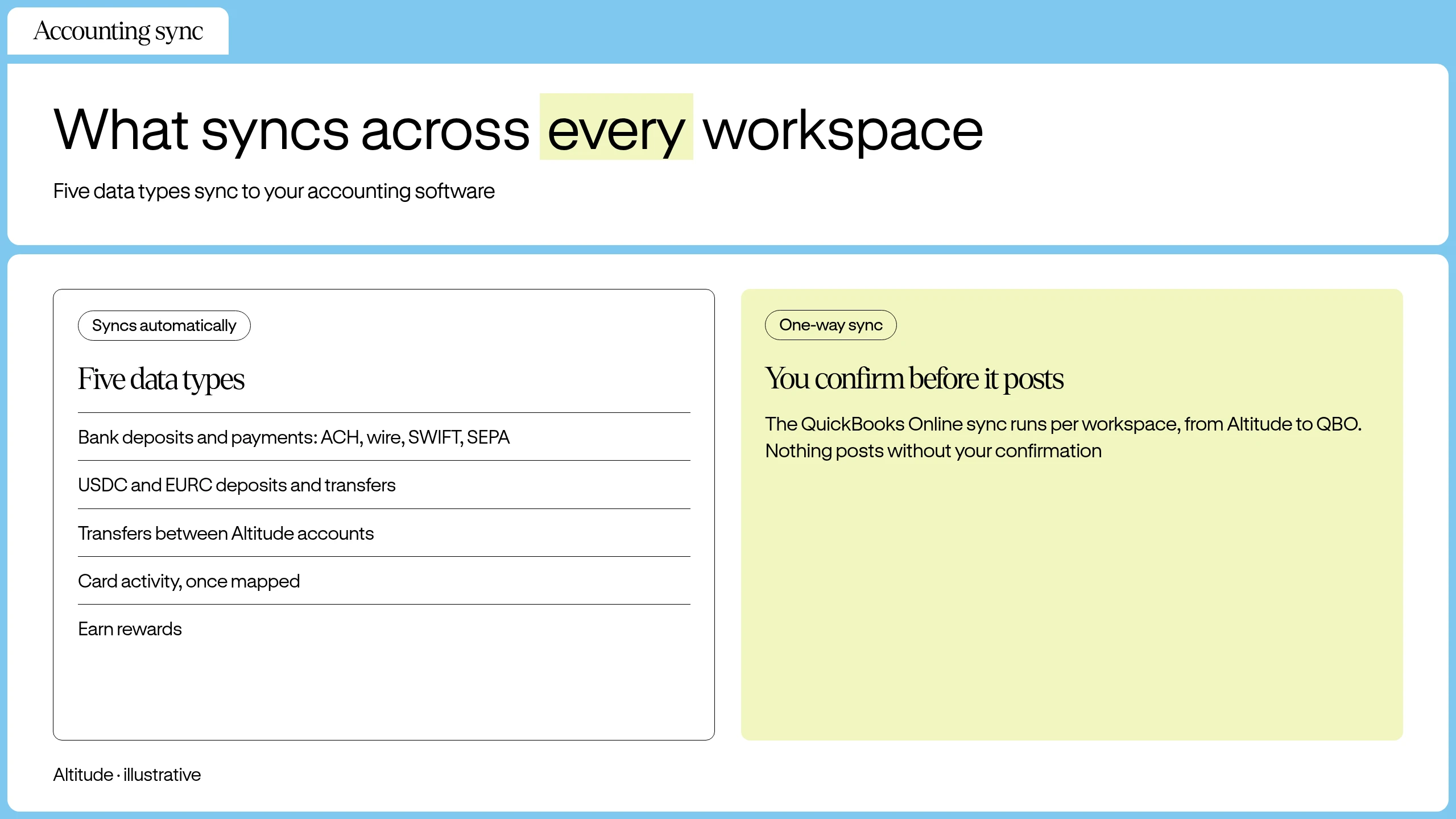
Accounting sync support varies by provider. Altitude's sync to QuickBooks Online and Xero, for example, is configured per workspace and posts:
- Fiat payments and deposits over ACH, wire, SWIFT, and SEPA
- Stablecoin deposits and payments, such as USDC and EURC
- Movements between the entity's own accounts
- Card spending
- Interest or rewards
Unified incident workflows by entity
When an entity has a payment failure or a suspicious transaction, you can triage from the same login while the incident record stays in that entity's workspace.
If a required signer is unavailable, the approval threshold isn't met until another eligible signer acts, so add signers to the workspace before time-sensitive payments. Role-based permissions give you control over who can initiate versus approve transactions within each workspace.
Granular audit records by workspace
Audit review pulls records from one workspace at a time: approval thresholds, signer actions, and transaction history stay attached to the entity where the payment happened. That scoping gives internal audit and external reviewers a complete per-entity record.
Intercompany transfers and consolidation basics
An intercompany transfer is a payment from one legal entity to another. In a workspace-per-entity setup, it follows the sending workspace's approval rules and appears in both workspaces' records. Fees depend on the payment rail, as covered under "Pricing per entity."
Many business accounts don't provide combined balances or consolidated reporting across entities. For group figures, export each entity's CSV, consolidate in your accounting system, and record each intercompany payment as a receivable or payable in both entities' books.
Setting up multiple business accounts under one login
Registering another business profile
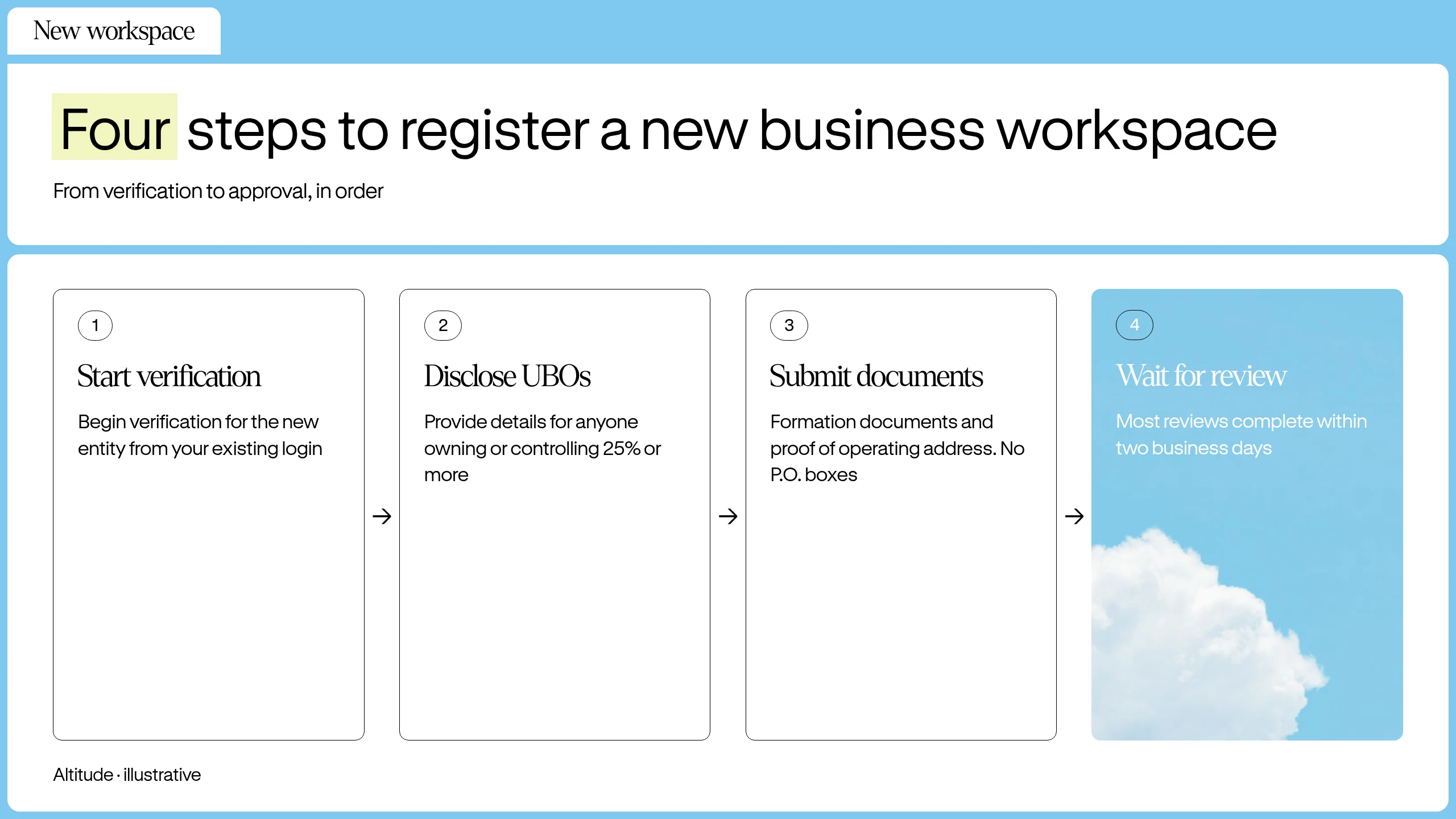
Financial institutions verify each legal entity separately, so a new entity doesn't inherit the first entity's approval. In the US, the FinCEN customer due diligence rule requires covered institutions to identify and verify the beneficial owners of each legal entity customer, which means every individual who owns 25% or more and one person who controls the entity. In a multi-entity account such as Altitude's, you add the additional legal entity as a new workspace from the same login, and that workspace goes through its own business verification. The steps below follow that process.
- Start verification: From your existing login, select the option to add a new entity or workspace and begin business verification for it.
- Disclose UBOs: Providers commonly ask for details of anyone who owns 25% or more of the business, plus one person who controls the company (for example the CEO).
- Submit documents: Upload formation documents, proof of operating address, and the entity's own tax ID: an EIN for a US entity, or the local tax identification number for an entity incorporated elsewhere. Providers expect each entity to have its own tax ID rather than its parent's. Many don't accept P.O. boxes or virtual office addresses.
- Wait for review: The provider reviews the submission before the new entity is active. Review times vary by provider and by how complex the ownership structure is.
Configuring entity-specific approval thresholds
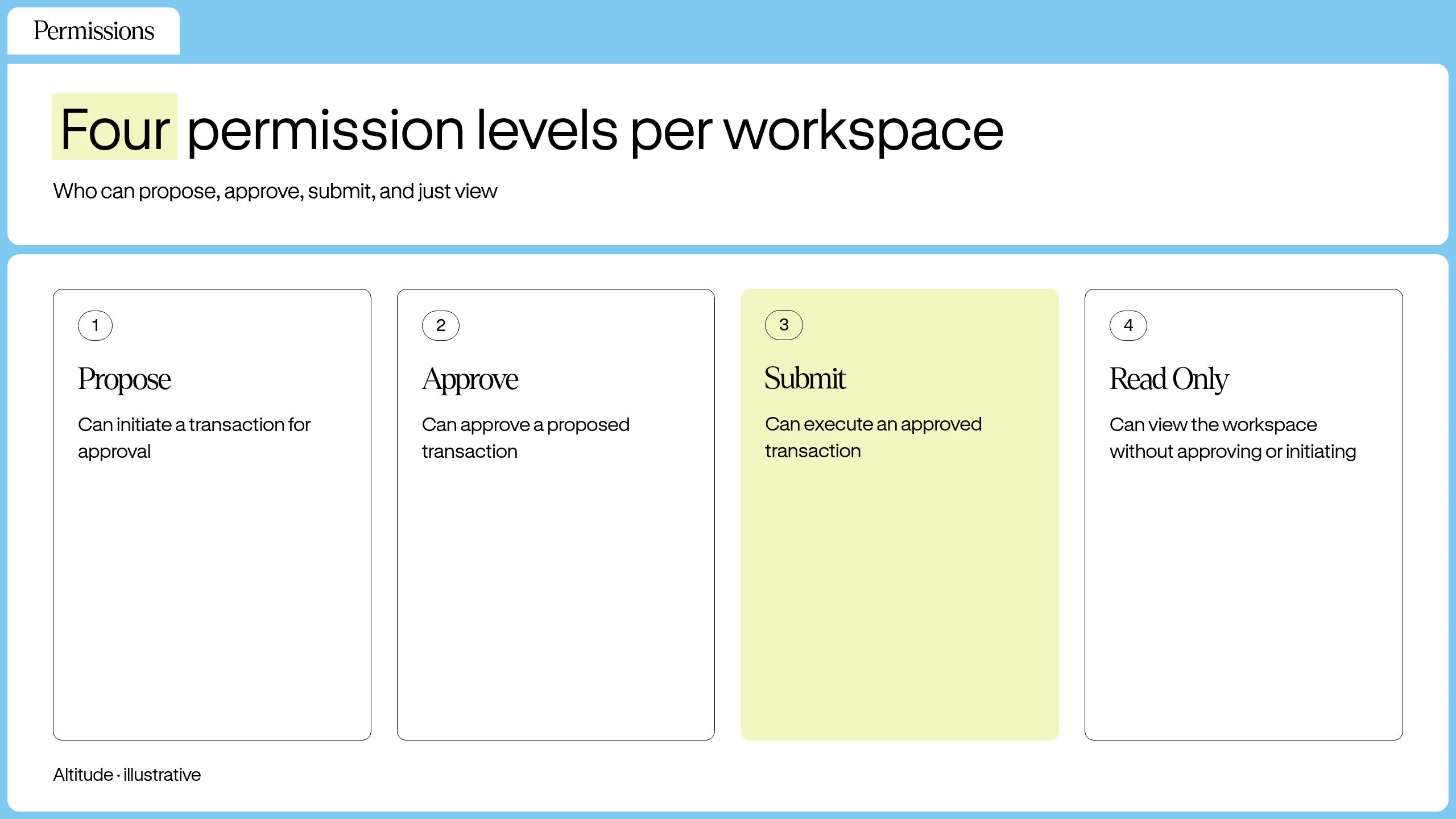
Set role-based permissions (for example propose, approve, and submit) and approval thresholds per workspace. Check what happens to pending payments when you change a threshold or signer permission, because some platforms cancel open proposals and require them to be recreated. In Altitude, changing an approval threshold or signer permission cancels every other open proposal, which must be recreated afterward. Card administration changes don't trigger this.
- Open workspace settings: Navigate to the workspace where you want to set thresholds.
- Set approval rules: Define the threshold (for example, two of three) so money moves only when enough of your team signs off.
- Assign roles: Give team members the permissions your provider offers, such as propose, approve, submit, or read-only, based on their function.
- Review open proposals: Check whether the change affects pending payments, and recreate any that were canceled once the change is confirmed.
Assigning team members to specific workspaces
Invite team members only to the workspaces they need. In a workspace-per-entity setup, each member's permissions are scoped to the workspace they're assigned to.
Where access is set per workspace, the same person can be a full member of one workspace and a limited cardholder in another. With Altitude, for example, an invited cardholder sees only their own cards, limits, and transactions, and nothing about the workspace's balances, treasury accounts, other cardholders, or members. Altitude's help center article on issuing a card to someone outside your workspace lists exactly what an invited cardholder can view.
Giving accountants and bookkeepers access
Where a provider offers a read-only role, give an outside accountant or bookkeeper read-only access to each entity they support, so they can see transactions without approving or submitting payments. Where access is set per workspace, permissions don't carry across entities, so an accountant who supports three entities needs three invitations. Accountants who prefer their own tools can work from each entity's CSV or PDF export.
Setting up accounting software for each entity
Connect each entity to the QuickBooks Online company or Xero organization that holds its books, so one entity's transactions never post into another's ledger. Use one QuickBooks Online company or one Xero organization per entity. Check whether the sync is one-way or two-way and whether postings need confirmation before they apply. Altitude's sync, for example, is configured per workspace, runs one way from Altitude to QuickBooks Online, and requires confirmation before each posting applies. It also syncs with Xero, on the same one-organization-per-entity basis.
Centralized login for every business
Managing subsidiaries under one login
A parent company with multiple subsidiaries can run each as a separate workspace, with each subsidiary keeping its own accounts, cards, and records under the same login. This structure supports the reality that legal entities must remain distinct for tax, liability, and regulatory purposes. A parent that controls its subsidiaries may still have to produce consolidated financial statements under standards such as ASC 810 or IFRS 10.
Unified workspace switching for multiple firms
In a multi-entity account, a workspace switcher moves you between entities, and each entity's account has its own account details for inbound transfers.
Pricing per entity
Fees for a multi-entity setup depend on the payment rail each entity uses, and some providers add a per-entity or monthly platform charge, so compare both. Published bank fee schedules show ACH transfers ranging from free to a few dollars each, outgoing domestic wires at roughly $15 to $35, and outgoing international wires at roughly $35 to $50, with intermediary banks sometimes deducting more. Foreign-currency card purchases commonly carry a foreign transaction fee of about 1% to 3%. Rates vary by bank and account tier, so check each provider's current fee schedule.
For comparison, Altitude's documented fees attach to the payment rail, not to the number of workspaces. Opening a workspace costs $0, there is no monthly platform fee, and there is no tiered pricing structure. ACH, EURC-funded SEPA, and supported stablecoin transfers carry no Altitude fee, outbound SWIFT costs $35 with a $100 minimum per transfer, and non-USD card purchases carry a 1% FX fee. Sending, intermediary, and recipient banks may still charge.
See how Altitude handles treasury for multiple legal entities from one login. Book a demo.
FAQs
Can I manage multiple businesses from one login?
Yes, if the provider supports multiple entities under one login. Each entity is a separate workspace with its own accounts, cards, approval rules, and records. Limits vary by provider.
Do balances combine across entities in one view?
Not in a setup that keeps entities separate. Each workspace reconciles independently, with its own accounts and transaction history, so there is no combined dashboard. Some providers offer a combined view, so check whether yours does. To combine figures, use your accounting software.
Can team members access multiple entities with the same login?
It depends on the provider. Where access is set per workspace, permissions don't carry across entities: a team member's access in one entity doesn't extend to another, and each workspace assigns its own members and roles.
How does reconciliation work for multiple business accounts?
Reconciling multiple entities means matching each entity's transactions against its own statements and ledger, then consolidating the books in accounting software. In practice, export each entity's CSV or PDF files, or use a per-entity accounting sync where the provider offers it, and review postings before they apply where the sync requires confirmation.
Are approval workflows shared across entities?
Not in a setup that keeps entities separate. Approval thresholds and role-based permissions are set per workspace, so each workspace is configured independently and thresholds aren't shared across entities. Check how your provider handles this.
How much does each additional entity cost?
It depends on the provider. Fees attach to the payment rail each entity uses, and some providers add per-entity or monthly platform charges, so check the fee schedule. With Altitude, an additional entity costs nothing extra: opening a workspace costs $0, there is no monthly platform fee, and there is no tiered pricing structure. The rail-by-rail fees listed under "Pricing per entity" apply to every entity.
Can an accountant or bookkeeper access each entity?
Yes, through read-only access per entity, where the provider offers a read-only role, or through exported files. A read-only role lets the accountant view transactions without approving or submitting payments. Where access is set per workspace, it doesn't carry across entities, so invite the accountant to each entity separately, or send them each entity's CSV or PDF export.
Can I move money between my entities?
Yes, as a payment from one workspace to another's account details. In a workspace-per-entity setup, the transfer follows the sending workspace's approval rules and shows in both workspaces' records, so record intercompany payments in each entity's books.
Does each entity need its own accounting file?
Yes. Keep a separate QuickBooks Online company or Xero organization per entity, and connect each workspace to its own file so one entity's postings never land in another's books. Where the sync requires confirmation before posting, review each posting before it applies.
Key terms glossary
Legal entity: A business structure with its own legal and financial identity, such as a corporation or LLC.
Workspace: An independent environment within a multi-entity business account that holds one legal entity's accounts, cards, approval rules, and records.
Entity-level permissions: Role-based access controls (such as propose, approve, submit, and read-only) and approval thresholds that are configured per workspace.
Position reconciliation: The process of matching transaction records across systems to confirm that balances and positions are accurate.
UBO (Ultimate Beneficial Owner): A natural person who owns 25% or more of a business, or the one person who controls it (for example the CEO), with no ownership threshold for control.
SEPA: The Single Euro Payments Area: 41 countries using common euro schemes such as SEPA Credit Transfer and SEPA Instant. Standard SEPA Credit Transfers settle by the next business day, and SEPA Instant settles in seconds, 24/7.
ACH: The Automated Clearing House network, the US bank transfer system for domestic USD payments. ACH transfers take 1 to 2 banking days, with same-day ACH available.
SWIFT: The international messaging network banks use to route cross-border payments. Most SWIFT payments arrive within a day, though some take several days.
EURC: A euro-denominated stablecoin issued by Circle, backed one to one by reserves.
USDC: A stablecoin denominated in US dollars and issued by Circle, with each token backed one to one by reserves.
QBO (QuickBooks Online): Cloud accounting software from Intuit that businesses use to record transactions, send invoices, and reconcile bank activity.
Xero: Cloud accounting software from Xero Limited that businesses use to record transactions, send invoices, and reconcile bank feeds.
Altitude is a financial technology platform, not a bank or digital asset custodian.