





 Startups
  Creative agencies
  Onchain teams
  European businesses
  AI
AI  Software
TL;DR: An open invoice is any issued invoice that has not been paid, and the distinction between open, outstanding, and overdue determines your next action: wait, follow up, or escalate collection. Tracking gets unreliable when payments arrive in multiple currencies across separate payment rails (the networks that move money, such as ACH, SEPA, or SWIFT) and platforms, because matching deposits and exchange rates by hand does not scale. Altitude resolves this by combining invoice status and payment execution in one account, so you can see what is owed and action the payment without switching platforms.
A founder managing cross-border payments without a finance hire usually feels this at month-end, when invoice status sits in three platforms and reconciliation lands on one desk. Each status calls for a different response: wait, follow up, or escalate. The fix is a single account where invoice status and payment execution live together.
Identifying your current outstanding invoices
Before you can collect, you need to know what stage each invoice sits in. The terminology varies across accounting systems, but the operational distinctions are standard.
Unpaid, outstanding and open invoices
An open or unpaid invoice is any invoice that has not been settled, regardless of whether the due date has passed. Outstanding is another label for the same state, and many businesses use all three terms interchangeably for any unpaid invoice. Some accounting systems assign the labels based on timing, but there is no shared standard for which term means what. The lack of standardization across systems is exactly why you need explicit status definitions in your tracking process.
Identifying overdue vs open invoices
An overdue invoice is past its due date and still unpaid. An invoice turns overdue the day after its due date if any balance remains. All overdue invoices are outstanding, but not all outstanding invoices are overdue. The distinction is temporal.
| Status | Definition | Action required | Cash-flow impact |
|---|---|---|---|
| Open (also called outstanding or unpaid) | Issued and not yet paid, whether still within terms or past the due date | Monitor, then follow up as the due date approaches | Expected inflow, at risk if the client delays payment |
| Overdue | Past due date with a balance remaining, a subset of open and outstanding invoices | Escalate collection | Revenue already recorded (accrual basis), consider a credit-loss allowance |
| Paid | Settled, balance zero | Archive | Cash received, available for use |
| Void | Cancelled before payment | Remove from receivables | Removed from AR, no cash expected |
Open-item vs balance-forward statements
A client statement can show your receivables in two formats. An open-item statement lists each unpaid invoice with its own date, amount, and due date, and applies payments to specific invoices. A balance-forward statement shows only the previous balance, the payments received, the new charges, and one ending balance, without tying each payment to a particular invoice.
For tracking open invoices, the open-item format is the better fit, because every payment closes a named invoice and the overdue ones are visible at a glance. Balance-forward suits high-volume billing with small recurring charges, where clients pay a running balance and per-invoice matching adds little.
Why monitoring unpaid invoices protects cash flow
When you know exactly how much money sits in outstanding invoices, you can forecast future cash flow accurately and anticipate delays before they become crises. Collection probability drops the longer an invoice sits unpaid, and published collectability charts based on collection agency data show the steepest declines past 90 days. The exact percentages vary by source and survey year, so use your own aging data for forecasts. As a worked example, every 10 percentage points of lost collection probability on a $10,000 invoice is $1,000 of expected cash that a contractor payment run planned against that invoice may not have.
Quantifying your invoice payment gaps
An example: take $50,000 in open invoices split into three aging buckets, counted in days since the invoice date: $30,000 at 0-30 days, $15,000 at 31-60 days, and $5,000 at 61-90 days. If your clients usually pay invoices in the 0-30 bucket on time, the $30,000 is the part of next month's cash you can plan around. The $15,000 in the 31-60 bucket depends on follow-up, so a forecast that counts only half of it adds $7,500 to the plan, and the other $7,500 is a buffer. Treat the $5,000 at 61-90 days as at risk and leave it out of the plan until a client confirms a payment date. On those assumptions, next month's planned inflow is $37,500, not $50,000. The bucket sizes and the 50% assumption are illustrative, so replace them with your own aging report and payment history.
Reading an AR aging report
An accounts receivable (AR) aging report lists open invoices by client and groups the balances in aging buckets, commonly 0-30, 31-60, 61-90, and over 90 days since the invoice date. Pick one basis, days since the invoice date or days past the due date, and keep it. The examples in this article use days since the invoice date. Mixing the two makes the buckets impossible to compare month to month. QuickBooks Online and Xero both include this report, so you can run it before you build a cash forecast. Watch for clients whose balances move into older buckets each month, and for a single large invoice that makes up most of a bucket.
How to calculate DSO
Days sales outstanding (DSO) shows how long collection takes on average. The formula is accounts receivable divided by credit sales for the period, multiplied by the number of days in the period. For example, $50,000 in open receivables on $150,000 of credit sales over 30 days gives a DSO of 10 days ($50,000 / $150,000 x 30).
The figures are illustrative. Compare your DSO with your payment terms: a DSO well above your terms means invoices stay open longer than agreed.
Reducing time spent on unpaid invoices
Receivables work consumes hours when a deposit arrives without a clear link to an invoice. A client may pay in a different currency than the invoice, send one transfer that covers several invoices, or leave the invoice number out of the payment reference, so someone has to trace each deposit back to the right invoice. Currency conversion on an inbound payment adds a rate lookup to that match. Putting your bank details and a required payment reference on every invoice reduces the tracing. In Altitude, deposit matching is manual today: you match one deposit to each invoice, and that one matched deposit marks the invoice as Paid.
How to forecast late payments
Look at your historical settlement windows. If your clients typically pay Net 30 invoices on day 35, build that five-day buffer into your cash forecast. Invoice aging reports help you identify which clients consistently pay late, so you can adjust terms or require deposits before work begins.
Build a rolling 60-day forecast that accounts for historical payment delays by client and by corridor (the country-to-country route a payment travels). If your US-based clients pay ACH invoices on average 5 days after Net 30, and your EU clients typically settle on day 28, model those patterns into your cash position.
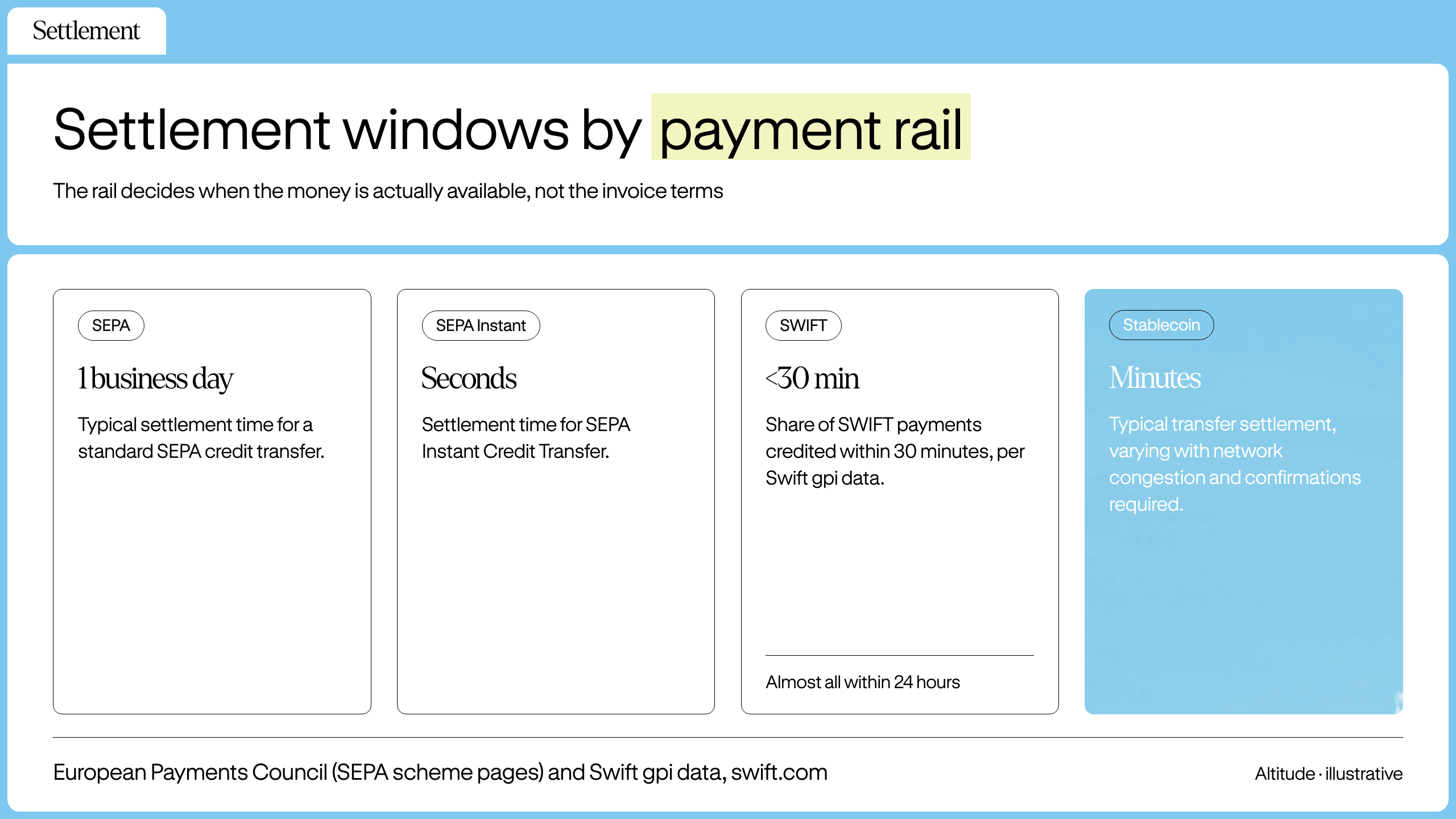
Track settlement windows by payment rail as well. A standard SEPA credit transfer typically settles in one business day, while SEPA Instant settles in seconds. Under Regulation (EU) 2024/886, euro-area payment service providers have had to send instant payments since 9 October 2025, so a client with a euro-area bank can usually pay you instantly. Banks outside the euro area follow their own timelines. When a client pays you by SWIFT, Swift gpi data shows most payments credited within 30 minutes and almost all within 24 hours. Payments that pass through banks outside gpi, compliance checks, or currency conversion can take longer, up to five business days.
Stablecoin transfers often settle in minutes, but actual timing depends on the network, current congestion, and how many confirmations the receiving side requires. When you know the rail and the client's payment history, you can forecast cash arrival with enough precision to schedule outbound contractor payments without maintaining excess reserves.
Monitoring your outstanding invoice status
Tracking methods vary by complexity. The right choice depends on your volume, currencies, and whether you have dedicated finance staff.
Managing unpaid invoices in spreadsheets
Spreadsheets can handle simple single-currency tracking at low invoice volumes, and Altitude adds invoice states and payment execution in the same interface once you cross into multi-currency flows. Spreadsheets break down when you add currency conversion because misapplied exchange rates and conversion errors can compound across large volumes of transactions, creating time-consuming reconciliation challenges. Once you scale, reconciliation in spreadsheets becomes increasingly laborious and error-prone.
Tracking invoices in accounting apps
QuickBooks Online (QBO) and Xero both handle invoicing and status tracking, and QBO also lets you accept payments through QuickBooks Payments. If your clients pay outside the accounting app, for example by bank transfer, you create the invoice in QBO or Xero and the client pays your bank account. In QBO, you match the bank-feed deposit to the open invoice so QBO marks it paid. In Xero, you reconcile the bank statement line against the invoice so Xero marks it paid. In both tools, that separation still leaves a reconciliation gap between your invoice status and your bank, because someone has to find and match each deposit.
Recording a payment or closing an invoice in QuickBooks or Xero
An invoice closes when the payments applied to it equal the amount owed. In QuickBooks Online, you either receive the payment against the invoice or match the bank-feed deposit to it, as described above. In Xero, you add a payment to the invoice or reconcile the bank statement line against it. Menu names change, so check each tool's help center for current steps.
If a payment covers only part of the invoice, the balance stays open. To clear an uncollectible remainder, issue a credit note or write it off instead of deleting the invoice, so the audit trail stays intact. Altitude's accounting sync is one-way, from Altitude to QuickBooks Online and Xero, and every posting requires your confirmation before it applies.
How Altitude handles invoicing
Altitude consolidates the invoice and the payment rail in the same account. You do not need to log into a separate AP tool to see what is owed or to execute the payment.
Invoice states and payment terms
You can create an invoice in USD or EUR with payment terms (On receipt, Net 15, Net 21 default, Net 30, or a chosen date). The invoice states are explicit: Draft, Open, Paid, Void. One matched deposit marks the whole invoice as paid.
For a distributed team managing invoices in multiple currencies, the operational difference shows up in the workflow.
| Metric | Manual spreadsheet tracking | Altitude invoicing + QuickBooks and Xero sync |
|---|---|---|
| Reconciliation work | Manual matching across bank feeds, payment platforms, and accounting records | One matched deposit per invoice, with each QuickBooks or Xero posting confirmed before it applies |
| Platforms involved | Multiple platforms checked separately, typically including a bank, payment processor, accounting app, and spreadsheet | Invoice status and payment execution in one account, with one-way sync to QuickBooks or Xero |
| Status visibility | Updated manually after checking multiple sources | Real-time invoice states: Draft, Open, Paid, Void |
| Multi-currency reconciliation | A manual rate lookup and conversion formula for every converted payment, with misapplied rates compounding across transactions | One deposit match per invoice, with the effective rate shown on the inbound transfer |
Current limitations: deposit matching is manual today, automatic matching is coming soon, and partial payments are not tracked. If a client pays 50% now and 50% later, you cannot record the partial payment against the invoice. You would need to track that outside the system or wait for the full amount.
| State | What it means | What happens next |
|---|---|---|
| Draft | Created, not sent | Edit or send |
| Open | Sent, unpaid | Wait for deposit |
| Paid | Full amount received | Archive |
| Void | Cancelled before payment | Remove from AR |
Handling invoices past their due date
When an invoice passes its due date, your action items shift from monitoring to collection.
Proactive steps for unpaid invoices
Before the due date arrives, verify the client received the invoice and has no disputes about the amount or deliverables. The schedule below is a recommended cadence, not a legal or industry standard, so adjust it to the client's payment history and your contract terms:
- 3 days before the due date: send a reminder with the invoice attached.
- Day 1 past due: send a short notice with the invoice number, amount, and original due date.
- Day 7: follow up again and ask for a specific payment date.
- Day 14: call or message the client's finance contact and ask whether a dispute or a failed payment is holding things up.
- Day 30: send a final written notice that states the next step, such as a late fee, a pause on new work, or referral to collections.
Document every contact attempt. Late fees only hold up if the client agreed to them before you issued the invoice. State the fee or interest rate and the date it starts on the invoice or in the contract, and check the rules in your client's jurisdiction and your own, because limits on what you can charge vary. If the client doesn't respond after the day 30 notice, escalate in order: contact a senior person at the client, pause new work if the contract allows it, send a formal demand letter, and then consider a collection agency, which may charge a fee on what it recovers.
How to request an unpaid invoice
Send a concise email referencing the invoice number, amount, and original due date. Attach the original invoice again. Ask for a specific payment date rather than a general "soon."
Partial payments and credit notes
A partial payment reduces the balance on an invoice without closing the invoice. If a client pays $4,000 of a $10,000 invoice, $6,000 stays open. Altitude does not track partial payments today, so record them in your accounting system or spreadsheet and keep the Altitude invoice Open until the full amount arrives.
A credit note reduces the amount owed on an issued invoice, for example after a pricing error, and leaves a record of why. A void does not, and it applies only to an invoice cancelled before payment. Altitude's listed invoice states don't include a credit note, so record them in your accounting system.
Late fees and interest
A late fee is a one-time charge, and interest accrues for each period an invoice stays unpaid. For example, 1.5% per month on a $10,000 overdue invoice adds $150 a month. The rate and figures are illustrative. Charge only what the client agreed to in writing before the invoice was issued, put the rate and start date on the invoice, and check the limits that apply in your jurisdiction and your client's.
Bad-debt write-offs and allowances
When an invoice is unlikely to be collected, accounting offers two approaches. Under the direct write-off method, you remove an invoice from receivables once you decide it's uncollectible. Under the allowance method, you estimate in advance how much of your receivables will go unpaid and record that estimate as a reserve, based on your aging buckets and payment history. Which method applies depends on your accounting basis. Tax treatment varies by jurisdiction, so confirm the method with your accountant.
Before writing off an invoice, document every collection attempt from the cadence above. If the client pays later, record the payment and reverse the write-off.
Check status of unpaid invoices
If you are using spreadsheets, check your bank feeds daily. If you are using Altitude, check the invoicing help center where Open Invoices remain visible until marked Paid or Void. If an inbound payment is rejected or returned, for example because of a compliance hold or a beneficiary name mismatch, send the client your correct account details and ask them to resend.
Transparency checklist for payment infrastructure
A EUR invoice paid by SWIFT usually credits within a day according to Swift gpi data, but intermediary banks or compliance checks can stretch that to several business days, and the funds then sit with your provider until you use them. As your payment volume grows, the compliance architecture of your provider becomes a direct operational risk, not just a due-diligence checkbox. Before you choose where to track invoices and hold funds, verify the points below. Questions 2, 4 and 5 draw on the FCA safeguarding rules, which apply only to payment and e-money firms authorized in the UK, so ask any provider outside the UK which safeguarding regime covers it:
- Fee transparency: Are rail fees stated per transaction (e.g., $35 for SWIFT outbound, $0 for ACH)?
- Fund segregation: Are customer funds segregated from corporate assets?
- Wind-down plan: If the provider stops operating, what happens to your balance?
- Safeguarding: Does the provider file monthly safeguarding returns, and does it conduct annual audits where its regime requires them? Under the FCA rules, firms safeguarding under £100k are exempt from the annual audit.
- Daily checks: Does the provider check daily that the funds it safeguards cover what it owes customers?
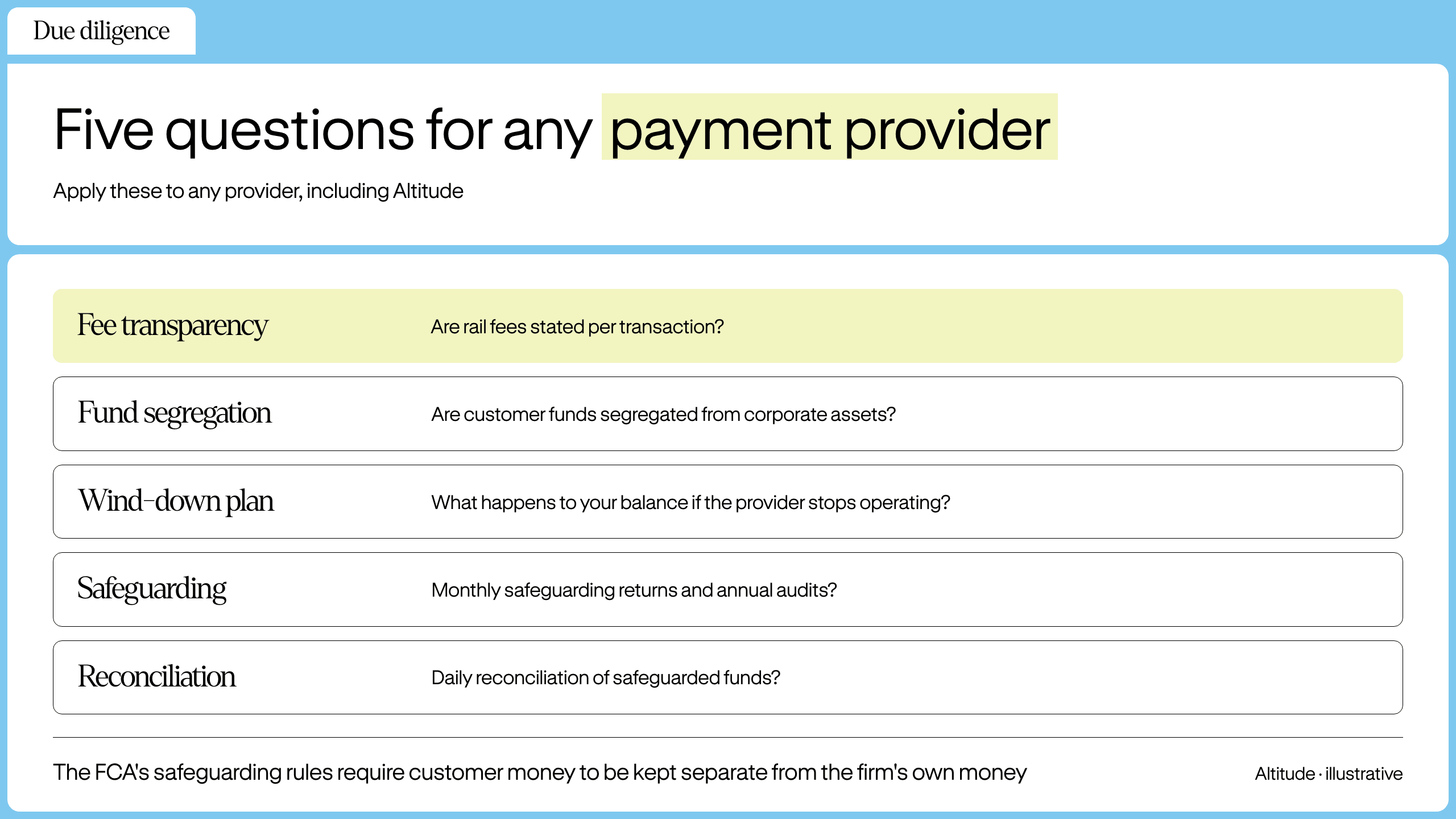
The FCA's safeguarding rules, in force since 7 May 2026, require UK payment and e-money firms to keep customer money separate from the firm's own money, so that it is available to be returned if the firm fails. The rules do not cover firms outside the FCA's remit.
Apply all five questions to any provider you evaluate, including Altitude. For the first, ask every provider for a per-transaction fee breakdown by rail, and get the answers to all five in writing before you move funds. Book a demo and see how Altitude handles cross-border payments.
FAQs
What does open invoice mean?
An open invoice is any invoice that has been issued but not yet paid. It is synonymous with unpaid invoice. Once payment is received and applied, the invoice status changes to Paid.
How long should an invoice stay open?
An invoice stays open from the moment it is sent until payment is received and applied, whether the terms are Net 15, Net 30, or a chosen date. If the due date passes with a balance remaining, the invoice also counts as overdue, and that is when you should follow up immediately.
What's the difference between an outstanding invoice and an overdue invoice?
An outstanding invoice is any unpaid invoice, whether or not the due date has passed. An overdue invoice is a subset of outstanding invoices where the due date has passed and the balance remains unpaid. All overdue invoices are outstanding, but not all outstanding invoices are overdue.
Can I track invoices in multiple currencies?
Yes, but you need a system that handles currency conversion and matching. Altitude supports invoicing in USD and EUR, with payments receivable via multiple rails, and the current invoicing limitations are listed in the Altitude section above.
What should I do if a client's payment doesn't arrive or doesn't match an invoice?
Ask the client for the transfer confirmation showing the amount, currency, and payment reference. If a compliance hold or a beneficiary detail mismatch caused the bank to reject or return the transfer, send your correct account details and ask the client to resend. For SEPA and SWIFT, the beneficiary name the client enters should exactly match your legal entity name on the account. If a deposit arrives without an invoice number, match it manually to the right invoice. The invoice stays Open until you do.
Key terms glossary
Net 30: Payment terms requiring full payment within 30 days of the invoice date. Altitude's default is Net 21.
Invoice aging: The process of categorizing unpaid invoices by how long they have been outstanding, counted in days since the invoice date (0-30, 31-60, 61-90, and over 90 days), to forecast collection probability.
Aging bucket: A date range used to group open invoices by days since the invoice date, such as 0-30, 31-60, and 61-90 days.
DSO (days sales outstanding): The average number of days it takes to collect payment after a sale. A rising DSO means invoices are staying open longer.
Credit note: A document the seller issues to reduce or cancel the amount owed on an issued invoice, for example after a pricing error or a returned item.
Deposit matching: The process of applying an inbound payment to a specific open invoice. In Altitude, this is currently manual.
ACH (Automated Clearing House): The US domestic bank transfer network. Altitude supports standard and same-day ACH.
SEPA (Single Euro Payments Area): The euro bank transfer scheme across the EU and participating countries. A standard SEPA credit transfer typically settles within one business day, while SEPA Instant settles in seconds.
SWIFT: The international messaging network banks use to route cross-border transfers.
Altitude is a financial technology platform, not a bank or digital asset custodian.