

TL;DR: A virtual card is a digital payment credential (card number, expiration date, CVV) that runs on standard card networks with no physical card. For businesses, a virtual corporate card lets finance teams issue separate cards to contractors, vendors and subscriptions, each with its own limit. Funding depends on the issuer and can be credit, charge, debit or prepaid. If you run a distributed team, its main value is control over who can spend what, set before a charge ever settles. Issuers typically let admins freeze or delete cards from the dashboard, review cardholder eligibility per person, and vary availability by country.
The first time you hand a shared company card to a new contractor, a real worry is what happens if that card gets used for something else. Fintech providers market virtual cards as a security feature for online purchases, but if you run a distributed team, the bigger value is control: knowing exactly who can spend what, where, and for how much, before the charge ever lands.
A virtual card is a digital payment card with its own card number, expiration date and CVV, issued without physical plastic. It runs on card networks such as Visa and Mastercard, or on American Express's own closed-loop network, and works for online checkouts.
Altitude, a global business account, issues virtual charge cards, and each one carries its own limits.
How virtual cards work for global teams
Financial institutions issue virtual cards through a website or app, and the cards process transactions on card networks such as Mastercard and Visa. Visa's virtual card documentation describes how virtual cards work on the Visa network. American Express also offers virtual cards, but it runs its own closed-loop network rather than the open-loop model Visa and Mastercard use. Depending on the issuer, you create a card in an app or online banking, set its limits, and close it when you're done.
For a business operating across borders, the operational difference is immediate. A contractor in Brazil gets a card number of their own, so there's no plastic to ship internationally, no wait for a physical card to arrive, and no need to share a single card number across the team.
How virtual corporate cards are funded
A virtual corporate card is funded in one of four main ways, using the card-type definitions in the Federal Reserve payments glossary as a neutral reference:
- Credit: draws on a revolving credit line from the issuer, and the business repays the balance later under the issuer's credit agreement.
- Charge: draws on an issuer credit line, but the balance is due in full each billing cycle, with no revolving credit.
- Debit: draws directly on money in a linked bank account.
- Prepaid: spends from money the business loads before use, so employees can only spend what's already on the card.
Under any of these models, a typical card transaction is cleared and settled through the card network between the issuer and the merchant's acquirer, and the acquirer then pays the merchant.
The Altitude Card is a charge card that spends from a dedicated card account the business funds in advance from its USD account, or automatically with auto top-up. Because the card is prefunded and has no credit line, spending stays limited to funds you've already loaded, which fits if you don't need a revolving credit facility for working capital.
Comparing virtual and physical card controls
| Feature | Virtual card | Physical card |
|---|---|---|
| Issuance | Usually usable within minutes of creation | Printed and shipped, so it arrives days or weeks after issuance |
| Number scope | Can have a separate number per vendor, or a single-use number | One number used everywhere the card is used |
| Replacement | A leaked number is replaced on its own, and other vendors are unaffected | A lost or compromised card means a new card and updating every vendor |
| Where it works | Online, and in shops only through Apple Pay or Google Pay | Any terminal that accepts the card, and ATMs |
| Theft risk | Can't be lost or skimmed at a terminal, though the number can still be stolen online or leaked by a vendor | Can be lost, stolen or skimmed at a terminal |
Virtual corporate cards work for online checkouts and recurring vendor billing. In-store payments are possible once the card is added to a digital wallet such as Apple Wallet or Google Wallet, which depends on the issuer, the card type and the merchant's terminal. Virtual cards are less reliable wherever a physical card must be presented, such as ATMs, hotel desks and car rental desks, which set their own card requirements. Physical cards work at in-person terminals.
Practical ways to deploy virtual corporate cards
A virtual card for business solves a specific set of problems when you're the de facto finance team:
- Settling vendor invoices without logging into a separate payment platform
- Setting contractor budgets as per-card limits and checking card activity against them
- Tracking SaaS subscription costs with dedicated card numbers per tool
- Calculating all-in FX costs before approving a non-USD purchase
- Matching card activity to your accounting records
Settling invoices via virtual cards
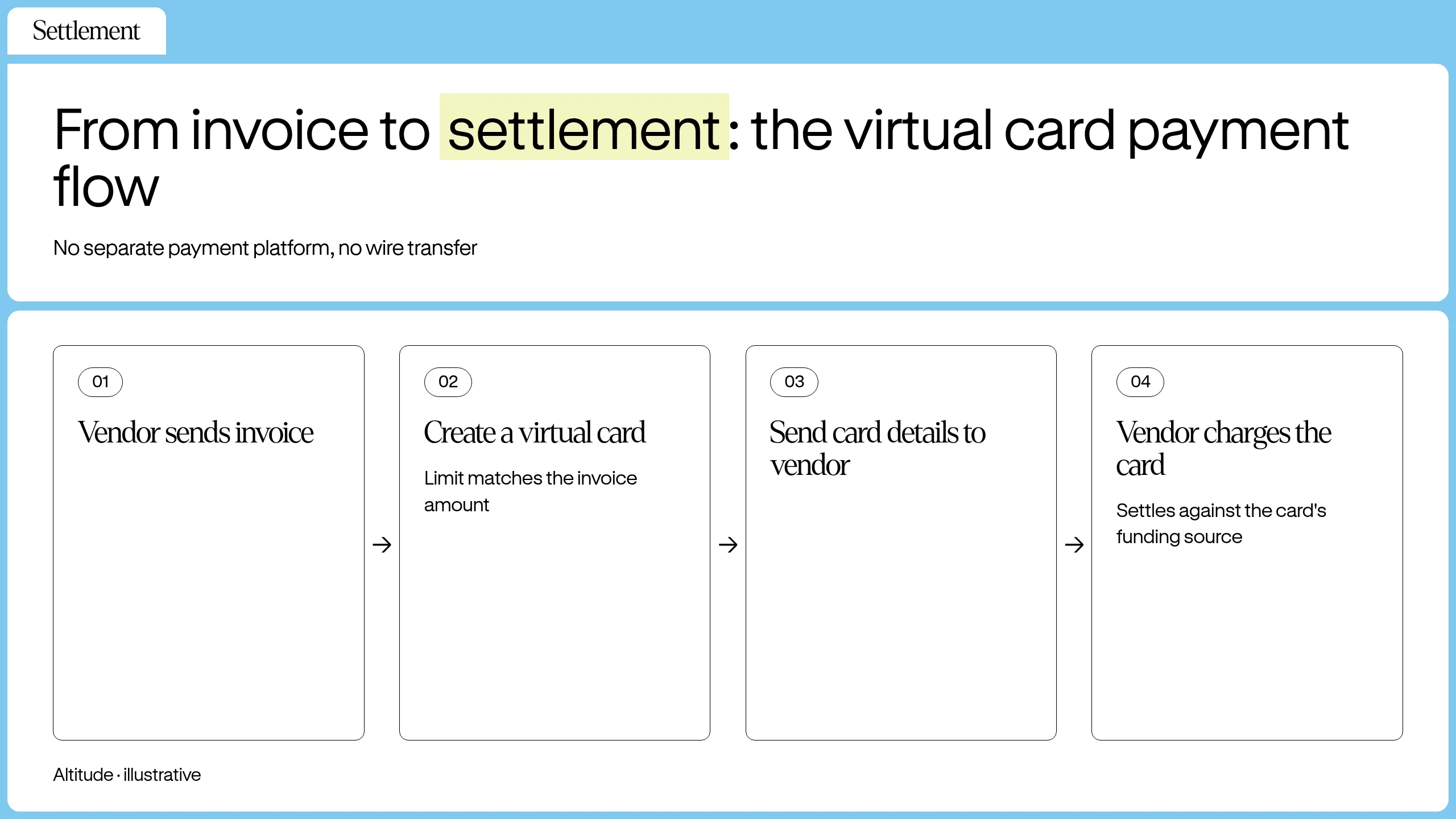
A vendor sends an invoice. You review it, create a virtual card with a limit matching the invoice amount, and send the card details to the vendor. The vendor charges the card, and the transaction settles against the card's funding source. No separate payment platform and no wire transfer are involved.
For recurring vendor payments, assign each vendor a dedicated virtual card with a monthly limit. If one card is compromised, the others continue working.
Controlling virtual card budgets
Per-card limits turn a virtual card into a budget enforcement tool. You set a ceiling for a contractor, vendor or project, then compare card activity against it to see how much of the budget is left.
Tracking virtual card subscription costs
Recurring SaaS subscriptions are a common source of surprise charges. You can create a dedicated virtual card for each subscription, set the limit to the monthly cost, and freeze the card if the subscription is cancelled. This prevents a cancelled subscription from continuing to charge a shared company card.
Handling FX fees on non-USD purchases
A foreign-exchange (FX) fee is a percentage added to each card purchase made in a currency other than the card's base currency, so a non-USD purchase costs more than the merchant's listed price. The Altitude Card charges a 1% FX fee on non-USD card purchases. To work out the all-in cost before you approve one:
- Convert the merchant's price to USD at the exchange rate you expect.
- Multiply that USD amount by 0.01 to get the FX fee.
- Add the fee to the USD amount and approve that total.
Setting spending rules for virtual cards
The control layer is where a virtual card becomes a finance function. You can configure spending rules at the card level, so each card carries the policy you set for it before any charge is made.
Setting spending limits per card
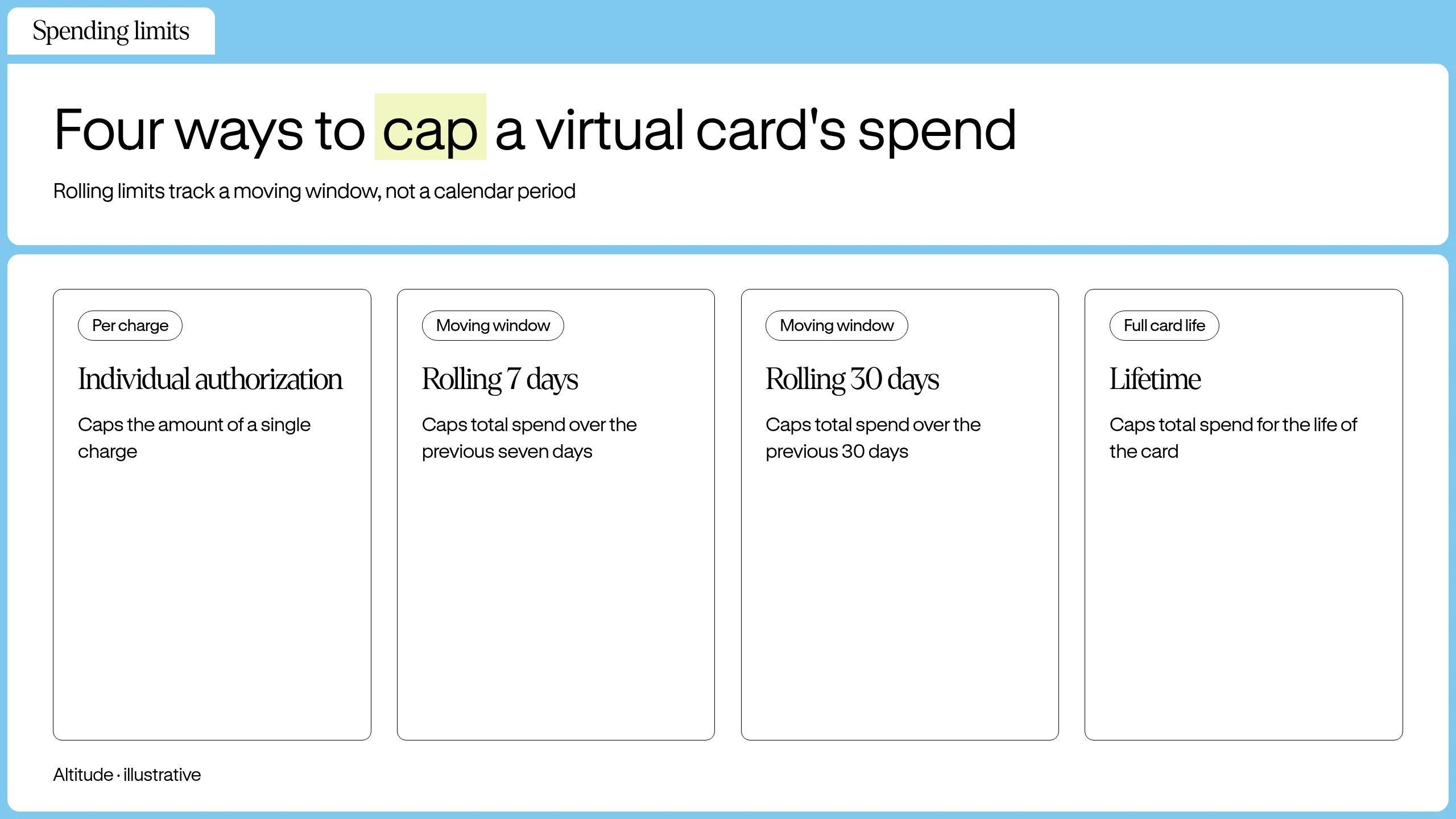
Issuers differ in which limits they offer. For example, the Altitude Card supports per-card limits by individual authorization, rolling 7 days, rolling 30 days, or lifetime:
- Individual authorization: caps the amount of a single charge.
- Rolling 7 days: caps total spending over the previous seven days, regardless of when the calendar week starts.
- Rolling 30 days: caps total spending over the previous 30 days, using the same moving window.
- Lifetime: caps total spending for the full life of the card.
Rolling limits measure spend over a moving window rather than a calendar period. Check card activity against each limit in the dashboard.
Matching limit types to card use
For a one-time equipment purchase or a trial subscription, a lifetime limit equal to the expected charge caps total spend on the card, and you can delete the card afterward. For a SaaS tool billed $200 a month, a rolling 30-day limit of $200 caps spend over a moving 30-day window, which covers one monthly charge. For a fixed-price vendor contract with a defined end date, a lifetime limit set to the contract value caps what that vendor can charge to the card.
Restricting cards by merchant category
A merchant category code (MCC) is a four-digit code that classifies a merchant's type of business, such as software, airlines or restaurants, as defined in ISO 18245. An MCC allowlist limits a card to approved business categories, and a blocklist declines the categories you exclude. Both work only on cards whose issuer supports MCC controls.
Fraud prevention and card security for virtual cards
Virtual cards limit fraud exposure because each card number is a separate credential from the account that funds it. If a number is stolen, the thief can attempt charges only within that card's limit and available balance, and can't reach the funding account or the business's other cards. Freeze controls and per-card limits also prevent overspend, so the same controls serve fraud response and budgeting.
How a compromised card number is contained
A virtual card number carries no login credentials or account access. Exposure is capped by what funds the card: the loaded balance and the card's limit on a prefunded card, or the credit limit on a credit-based card.
Single-use and per-vendor cards
A single-use or burner card is valid for one transaction or one merchant and then closes, so a stolen number has nothing left to charge. Issuers without a single-use option can get a similar result by setting a lifetime limit equal to the expected charge and then deleting the card. For recurring vendors, a dedicated card per vendor keeps one breach from affecting the others.
A multi-use card stays active for repeat charges until it reaches its limit or an admin deletes it, which suits recurring vendors. A temporary card expires on a set date or after a set period, while a permanent card stays open until an admin deletes it. A dynamic CVV is a security code that changes on a schedule so an old code stops working, and not every card has one.
Merchant locking
Merchant locking restricts a card to one merchant or merchant category, so a stolen number declines everywhere else. Category-level locking uses the MCC allowlists described above, so it's available only on cards that support them.
3-D Secure authentication
3-D Secure (3DS) adds a second check to some online card payments: the issuer asks the cardholder to confirm with a one-time code or an app approval before the charge completes. EMVCo's 3-D Secure documentation describes the protocol. In Europe, most online card payments need strong customer authentication, usually through 3DS, under the PSD2 rules in Regulation (EU) 2018/389. Elsewhere it depends on the merchant and issuer, and low-risk payments are often approved in the background without a code. A thief with only the card number typically can't pass the code step on a payment that requires it, so 3DS adds a check to some payments rather than all of them.
Tokenization and data security standards
The Payment Card Industry Data Security Standard (PCI DSS) sets security standards to protect cardholder data across the payments industry. Payment tokenization replaces sensitive card information with a unique identifier, and EMVCo's payment tokenisation documentation covers that basic definition.
For the difference between token types, the PCI Security Standards Council's PCI DSS Tokenization Guidelines separate tokens generated by cryptographic methods from tokens that are random values mapped to the card number in a secured card data vault. Based on that distinction, how much protection a token gives depends on the implementation. A token that is a random substitute mapped to the card number in a secured vault can't be reversed without access to that vault, while a token produced by reversible encryption can expose the underlying card number if the encryption key is compromised.
Card freezing and deletion
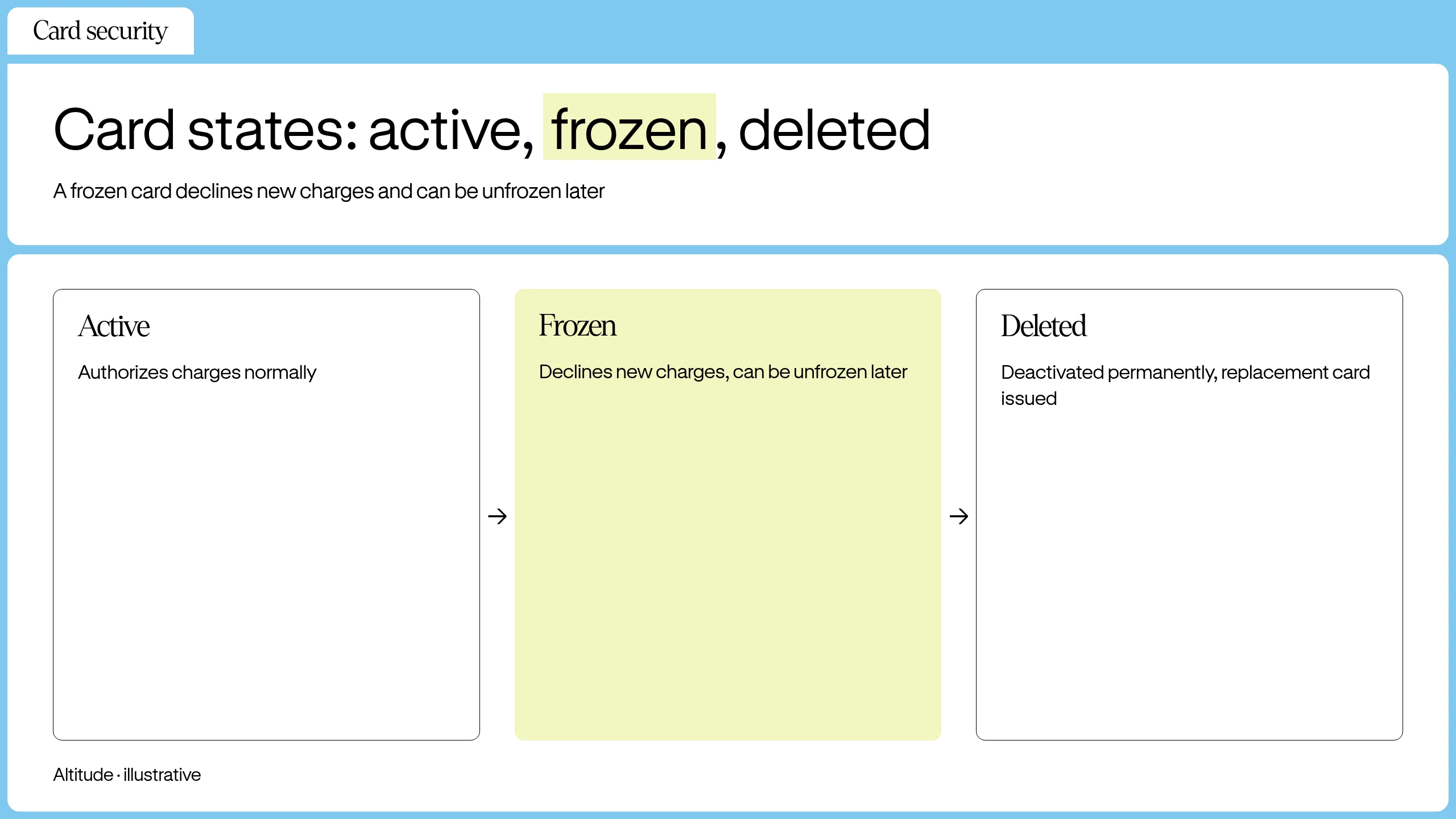
Many issuers let admins freeze or delete a card from the dashboard, and some also let cardholders freeze their own card. A frozen card declines new charges, and you can unfreeze it later. Treat deletion as permanent and issue a replacement card.
If a card number is compromised, freeze the card, issue a replacement and send the vendor the new card details. The old card then accepts no new charges.
Quick steps for virtual card activation
In general, an admin creates the card and sets its limit, the cardholder receives the card details, and the cardholder completes any identity checks the issuer requires before the card works.
The process for the Altitude Card follows four steps:
- You create the card in the Altitude dashboard and set the spending limit.
- You assign the card to the cardholder, who starts activation.
- Cardholder confirms legal name and address and accepts the Authorized User Agreement.
- If the cardholder passes it, the card can be added to Apple Wallet or Google Wallet for in-store payments.
What per-card control changes for a distributed team
Per-card limits, freeze controls and separate card numbers move spending decisions from after the charge to before it. A finance lead can give each contractor, vendor or subscription its own ceiling and shut off one card without disturbing the others. Each limit still needs an owner who checks card activity against it.
See how Altitude handles contractor and supplier payments across borders. Book a demo.
FAQs
Can I use a virtual card for international payments?
A virtual card can be used for online purchases from merchants that accept the card's network, such as Visa. Card networks and issuers restrict transactions in some sanctioned jurisdictions, so check the supported-country list before relying on a card for a specific country. The Altitude Card processes transactions on the Visa network.
What happens if a virtual card number is stolen?
You can freeze the card from the dashboard to stop new charges. You can then delete the compromised card and issue a replacement, without waiting for a physical card to arrive.
Who is eligible for the Altitude virtual card?
Eligible businesses from supported countries can receive cards, but cardholders resident in any of the blocked countries, or with a billing or residential address in Nevada or New Mexico, can't. Altitude reviews eligibility per cardholder, not per company.
Key terms glossary
Merchant category code (MCC): A four-digit number that labels a merchant by the kind of goods or services it sells. The ISO 18245 standard defines MCCs for retail financial services, and card networks such as Visa and Mastercard maintain their own code lists, from which a merchant's acquiring bank assigns the code.
Tokenization: A security process that replaces a card number with a unique token for use in transactions. Whether a token can expose the underlying card number depends on the implementation: vault-based tokens can't be reversed without access to the vault, while tokens produced by reversible encryption can be. The PCI Security Standards Council's PCI DSS Tokenization Guidelines describe these token types.
PCI DSS: The Payment Card Industry Data Security Standard, a baseline of security standards for businesses that handle cardholder data.
Altitude is a financial technology platform, not a bank or digital asset custodian.