

 Startups
  Creative agencies
  Onchain teams
  European businesses
  AI
AI  Software
Altitude Accounting connects your business account to QuickBooks and Xero, combining transaction review and syncing into a single workflow. Now, Suggestion Engine builds on that foundation by putting your previous accounting decisions to work.
Where relevant posting history is available, Altitude suggests a category and transaction type based on how you've previously posted similar transactions. You get a starting point for review, with supporting evidence and control over what goes into your books.
Put previous decisions to work
A recurring payment shouldn't require you to recreate the same accounting setup every time.
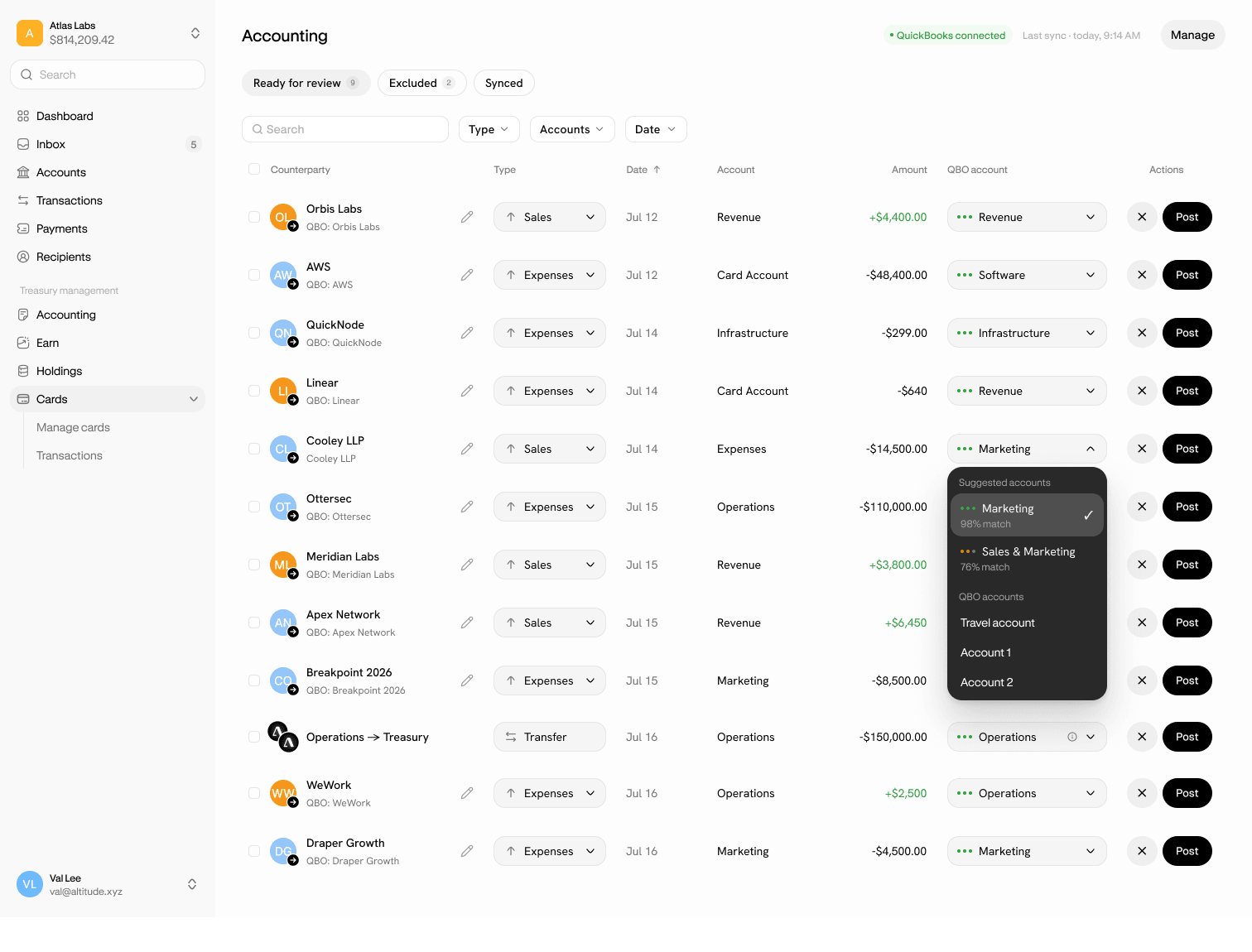
Suggestion Engine looks for previous transactions involving the same counterparty and a similar amount, then suggests the accounting treatment you've used before. Each suggestion includes both the category and transaction type, so you can review them together.
Check whether the suggestion fits the transaction in front of you, make any changes, and sync when you're ready.
Know the why behind each suggestion
Open the Category menu to see the suggested options, their supporting explanations, and the strength of the historical evidence behind them.
When alternatives are available, you can compare them before choosing. The evidence helps you assess the suggestion; you decide whether it's the right treatment for this transaction.
You make the final call
Choose a suggestion, select an alternative, or configure the transaction manually. Every posting still needs your review and confirmation before syncing to QuickBooks or Xero.
As you finalize more transactions, those decisions can inform suggestions for related entries. When suggestions change, Altitude flags the update while preserving your saved choice. You can review the new options without losing the setup you've already selected.
If no suggestion is available, manual categorization and syncing remain available.
Give your next review a head start
Already connected to QuickBooks or Xero? Open Accounting > For review and check the Category menu for available suggestions. Review the category and transaction type, make any changes, and sync when you're ready. If no suggestion appears, categorize the transaction manually and sync as usual.
Haven’t connected your accounting software yet? Connect QuickBooks or Xero in Altitude Accounting to get started, then follow the steps above.
Keep building, with less admin slowing you down.